
Choosing between a Baseus monitor light and competing screenbars for eye comfort depends on your specific desk layout, monitor shape, and lighting preferences. Baseus models are known for their compact, asymmetric optical designs and straightforward physical controls, making them a practical choice for standard flat monitors. Meanwhile, alternative brands often offer advanced features like automatic ambient light sensors, specialized mounts for curved screens, or wireless dial controllers. To find the right fit, you must evaluate how each option handles glare reduction, workspace coverage, and physical compatibility with your monitor.
As modern workspaces transition toward ergonomic efficiency, the screenbar has become a staple accessory for professionals, students, and gamers alike. Unlike traditional desk lamps that occupy valuable desk real estate, these compact light bars mount directly onto your display, projecting light exactly where it is needed. However, because visual comfort is highly subjective and depends on environmental factors, understanding the underlying technology of these devices is key to making an informed decision.
What Makes a Screenbar Effective for Eye Strain?
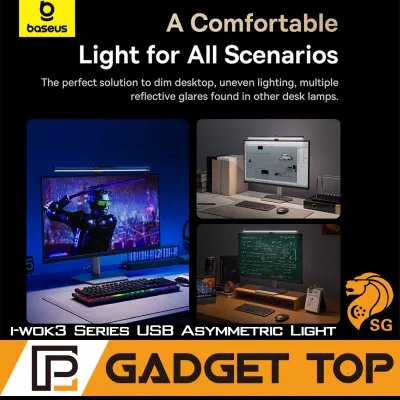
To understand how a screenbar reduces eye strain, it is essential to look at how it directs light. Traditional desk lamps often cast light in a wide cone, which can bounce off your computer screen and create a harsh glare. This glare forces your eyes to constantly adjust between the bright reflection and the actual content on the screen, leading to fatigue, headaches, and dry eyes over long work sessions. An effective screenbar solves this problem by utilizing an asymmetric optical design. This specialized engineering directs the light downward and forward at a precise angle, illuminating your keyboard and desk surface while keeping the screen itself completely in the dark.
Products mentioned in this guide
![Baseus Eye-Care PC Monitor Screen Hanging Light LED Desk Lamp For Computer Brightness Adjustable Reading Lamp [3 Color Temperatures]](https://img.lazcdn.com/g/p/6c56f96fef8a41e41824f2b9c23ee95e.jpg_400x400q80.jpg_.webp)
![Baseus LED Screen Light Computer Laptop Screen Book light Desk Light LCD Monitor Lamp Study Reading Light PC Night Light for Home Office School light [Black]](https://img.lazcdn.com/g/p/a9e53b263ca4a9a3ac9375a9285b835c.jpg_400x400q80.jpg_.webp)
Prices are valid at publication and may change. Please refer to the product page for the latest price.
Beyond glare prevention, the uniformity of light across your workspace plays a critical role in visual comfort. When you work in a dark room with only a bright monitor shining, your pupils must dilate and contract repeatedly as your gaze shifts between the screen and your dark desk. A high-quality screenbar provides balanced, even illuminance across your immediate work area, minimizing these extreme contrast zones. Lighting standards often recommend maintaining a balanced contrast ratio between your screen and the surrounding environment to prevent the ciliary muscles in your eyes from overworking.
Furthermore, the ability to adjust both brightness and color temperature allows you to match your environment to the time of day. Cooler, blue-toned light (typically above 5000K) can enhance alertness and focus during daytime tasks by mimicking natural daylight. Conversely, warmer, amber-toned light (around 2700K to 3000K) reduces blue light exposure in the evening, helping your eyes relax and supporting your body’s natural circadian rhythm as you wind down for the night.
Evaluating Baseus Monitor Lights for Visual Comfort
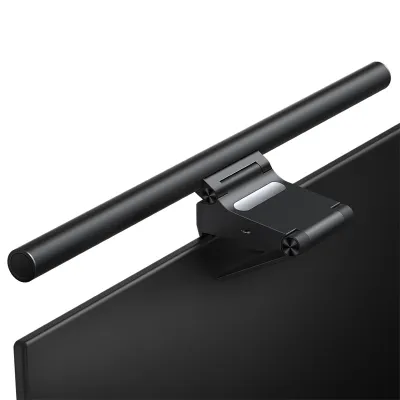
Baseus monitor lights are popular choices for home offices and study spaces due to their practical design and accessible functionality. The brand typically implements its asymmetric light path using a combination of angled LEDs and reflective internal sheets. This setup is designed to project light at a forward angle, keeping the beam clear of the screen surface. However, because these optical paths can vary slightly between different Baseus product generations, it is important to verify the specific light angle and cut-off line of the model you are considering to ensure it aligns correctly with your seating position.

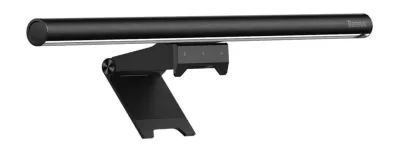
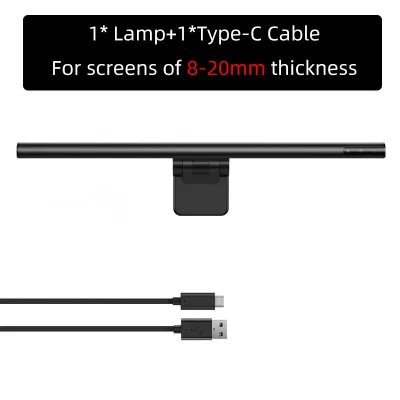
In terms of build quality, many Baseus models utilize an aluminum alloy housing. This material choice not only provides a sleek, modern aesthetic but also aids in heat dissipation, which is crucial for maintaining the efficiency and lifespan of the LEDs. The integration of a standard USB-C interface simplifies power delivery, allowing you to run the light bar directly from a computer port, a monitor hub, or a standard wall adapter.
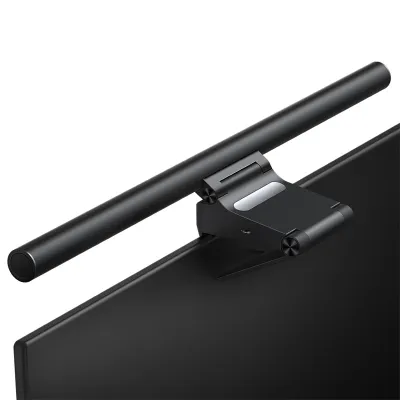
Control mechanisms on Baseus screenbars are generally straightforward and user-friendly. Many models feature touch-sensitive panels integrated directly into the ends of the light bar, allowing you to cycle through color temperature presets or adjust brightness levels with a simple tap. While these on-board controls keep your desk free of extra accessories, pressing them can sometimes cause lightweight monitors to wobble slightly. To address this, some premium Baseus variations include physical rotary dials or external controllers that make adjustments smoother. Additionally, their mounting systems usually rely on a gravity-counterweight clamp that rests gently on top of the monitor bezel, providing a stable hold on standard flat screens without the need for tools or adhesives.
How Competing Screenbars Tackle Visual Fatigue
As you explore alternative screenbar brands, you will find a variety of optical and ergonomic strategies designed to optimize visual comfort. Some high-end competitors focus heavily on precision engineering, utilizing custom-molded lenses or micro-reflector arrays that create an incredibly sharp light cut-off line. This level of precision ensures that absolutely no light spills onto the screen, virtually eliminating the risk of secondary reflections. While these advanced optical systems often come at a higher price point, they provide a highly controlled beam that is particularly beneficial for glossy screens or highly reflective desk surfaces.
Another area where competing brands often differentiate themselves is through smart automation. Many rival screenbars feature built-in ambient light sensors that continuously monitor the surrounding room lighting. With an auto-dimming mode activated, the screenbar automatically adjusts its brightness level in real-time to maintain a consistent level of illumination on your desk, preventing the light from becoming too intense as daylight fades. This hands-free adjustment is especially useful for users who work near windows where natural light levels change constantly throughout the day.
Furthermore, some competitors offer highly customizable color temperature settings and dedicated software integration, allowing you to sync your desk lighting with your computer’s system clock or create personalized profiles for reading, coding, and general screen work. High Color Rendering Index (CRI) ratings are also a common focus among premium alternatives. A screenbar with a high CRI (such as Ra95 or above) ensures that colors on your desk look natural and vibrant, which is highly beneficial for designers, artists, or anyone working with physical documents alongside their digital screen.
Specification Checklist for Screenbar Comparison
Before making a decision, it is helpful to compare the technical specifications of Baseus models against competing screenbars. Because performance metrics can vary significantly based on the specific product generation and power source, you should always verify these details on the manufacturer’s official product label or user manual.
| Feature | Baseus Typical Range | Competitor Typical Range | What to Verify |
|---|---|---|---|
| Color Temperature | 3000K – 6500K (Preset steps) | 2700K – 6500K (Stepless or presets) | Check if the presets match your preferred warm or cool lighting levels. |
| Power Input | 5V, 1A or 2A (USB-C) | 5V, 1A to 2.4A (USB-C or USB-A) | Ensure your monitor's USB port or power adapter meets the required wattage. |
| Dimming Method | Touch steps or rotary dial | Auto-dimming sensor, wireless dial, or app | Confirm if you prefer automated adjustments or manual controls. |
| Mounting Style | Gravity clamp / spring clip | Counterweight, magnetic, or curved adapter | Verify compatibility with your monitor's back panel shape and thickness. |
When reviewing these specifications, pay close attention to the electrical requirements. Operating a screenbar with an underpowered USB port can lead to flickering, dimming, or automatic shut-offs. Always check the product manual to confirm whether your monitor’s built-in USB hub can supply the necessary current, or if you will need to connect the device to a dedicated wall adapter. Additionally, look for safety and quality certifications such as CE, FCC, or RoHS, which indicate that the product has met standard electrical safety guidelines.
Verifying Mounting and Desk Setup Compatibility
Physical compatibility is just as important as optical performance when choosing a screenbar. Before purchasing, you must measure your monitor’s top bezel depth and overall thickness. Many modern monitors feature ultra-thin bezels or edge-to-edge glass; if a screenbar’s mounting clamp extends too far down, it can put physical pressure on the LCD panel itself, potentially causing screen damage or distracting shadows. Ensure the clamp’s contact points are padded and designed to rest only on the outer plastic frame of your display.
You should also consider how the screenbar will interact with other accessories on your desk. If you use an external webcam for video calls, a top-mounted screenbar may block the camera’s mounting clip or cast a harsh light directly into the camera lens. Some screenbars offer specialized webcam adapters or offset mounts to resolve this issue. Additionally, if your monitor is mounted on an adjustable articulating arm, ensure the screenbar’s weight does not exceed the arm’s tension limits, and route the power cable with enough slack to allow for full range of motion without straining the USB ports.
Dual-monitor and ultrawide setups require extra planning. If you use two monitors side-by-side, a single screenbar might not cover both screens evenly, or the clamps might interfere with the angle where the displays meet. In such cases, installing two smaller, matching screenbars or choosing a model with a wider light bar and a highly adjustable mount can help maintain uniform illumination across your entire field of view.
Decision Framework: Which Screenbar Fits Your Setup?
To choose the right screenbar for your workspace, consider your specific desk environment, monitor type, and daily habits. If you are setting up a standard flat monitor in a compact home office—such as a study corner in a Singapore apartment—and you prefer a straightforward, cost-effective solution, a Baseus monitor light is highly suitable. Its compact footprint, reliable asymmetric light path, and simple manual controls provide excellent value without cluttering your desk with extra accessories or external control dials.
On the other hand, you may want to look at competing brands if your setup involves more complex requirements. If you work on a heavily curved monitor, a standard gravity clamp may not sit securely, making a specialized curved-screen mount or a light bar with a matching physical curvature a safer choice. Similarly, if your room experiences dramatic shifts in natural light throughout the day, a screenbar with an active auto-dimming sensor will save you from constantly making manual adjustments.
Finally, consider the long-term durability and maintenance of the device. A simpler manual light bar has fewer electronic components that could fail over time, making it a highly reliable choice for basic setups. Conversely, a highly automated smart light bar offers unparalleled convenience but may require more troubleshooting if sensors or companion apps malfunction. Always verify the physical dimensions, weight limits, and power requirements of your chosen model against your monitor’s specifications before finalizing your purchase.
Frequently Asked Questions (FAQ)
Do monitor lights completely eliminate screen glare?
While screenbars with asymmetric optics are highly effective at preventing direct light from reflecting off your screen, they cannot completely eliminate all forms of glare. If your desk is positioned directly opposite a bright window or under an unshielded overhead light fixture, those external light sources will still cause reflections, especially on glossy screen coatings. To achieve the best visual comfort, you should position your monitor away from direct window light and use the screenbar to provide balanced, localized illumination on your desk surface.
Is a Baseus monitor light compatible with curved monitors?
Compatibility with curved monitors depends entirely on the specific Baseus model and the curvature radius of your screen. Standard gravity clamps are primarily designed for flat displays and may slip or put uneven pressure on a curved back panel. If you have a curved monitor, you must check the product manual or manufacturer specifications to confirm if the clamp design supports your monitor’s thickness and curvature (such as 1000R or 1500R), or look for models specifically labeled as curved-monitor compatible.
Community discussion
Share your experience or ask a question. Comments are reviewed before publication.