
Quick Answer: Is the BenQ WiT Right for Your Workspace?
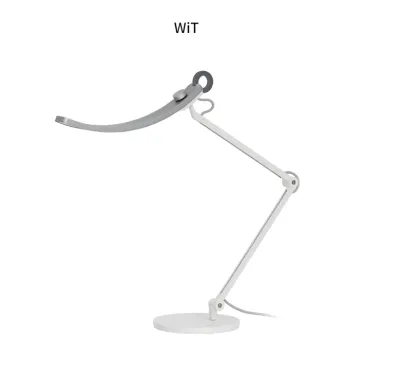
The BenQ WiT is a highly specialized premium desk lamp that excels at providing a wide, curved arc of illumination and reducing screen glare. Its unique crescent-shaped head is engineered to distribute light evenly across a broad horizontal plane, making it exceptionally well-suited for multi-monitor setups, large desks, and workspaces where you constantly transition between reading digital screens and physical documents. If your primary goal is to eliminate harsh glare on your monitors while maintaining uniform brightness across your entire desk, the BenQ WiT is one of the strongest contenders on the market.
However, the BenQ WiT may not be the ideal choice for every workspace. If you prioritize an ultra-minimalist aesthetic with hidden wiring, require a highly focused, narrow spotlight for physical drafting or detailed manual crafts, or want deep integration into a connected smart-home ecosystem (such as Apple HomeKit or Google Home), other premium lamps will likely serve you better. Ultimately, the best choice depends on your specific desk dimensions, your primary daily tasks, and your aesthetic preferences.
Key Dimensions for Comparing Premium Desk Lamps
When evaluating high-end lighting for your workspace, it is easy to get distracted by sleek designs and marketing buzzwords. To make an objective decision, you must focus on the core technical and physical specifications that directly impact your eye comfort, productivity, and desk usability.
Products mentioned in this guide
Prices are valid at publication and may change. Please refer to the product page for the latest price.

Illumination Spread and Glare Control
Traditional desk lamps typically feature straight, linear heads or circular spotlights that cast a concentrated cone of light directly beneath them. While this is effective for illuminating a single book or notepad, it often creates a harsh “hot spot” of high brightness in the center of your desk, leaving the surrounding areas in deep shadow. This high contrast forces your eyes to constantly adjust as you look around your workspace, leading to rapid eye fatigue.
To evaluate a lamp’s illumination quality, look for manufacturer specifications regarding lux uniformity and coverage area. A premium lamp should provide a minimum of 500 lux across your primary working zone, which is the recommended level for detailed office work. Furthermore, check for flicker-free certifications (such as compliance with IEEE PAR 1789 standards). Invisible high-frequency flicker, common in cheap LEDs, can cause headaches and eye strain even if you cannot consciously perceive it.
Screen glare is another critical factor in a modern digital workspace. When a desk lamp’s light reflects off your monitor screen, it washes out contrast and makes text difficult to read. Premium lamps solve this either through physical shielding or asymmetric optical designs that direct light downward and forward at a precise angle, illuminating your desk surface while keeping the light path completely clear of your screen.
Adjustability and Ergonomic Reach
An ergonomic desk lamp must adapt to your physical setup, not the other way around. If you use a modern 27-inch or 32-inch monitor, a standard short-arm desk lamp will likely be blocked by the screen, casting awkward shadows or forcing you to place the lamp in an awkward, off-center position.
High-end lamps feature articulated arms with multiple axes of rotation, often utilizing heavy-duty friction joints or counterbalanced spring systems. These mechanisms allow you to adjust the height, angle, and lateral position of the light source smoothly. Before purchasing, measure the height of your monitor from the desk surface to the top bezel. Ensure the lamp you choose has a maximum height reach that allows the light head to sit comfortably above your screen.
Additionally, consider the joint tension. Cheaper lamps often sag over time, requiring constant tightening of plastic knobs. Premium lamps use metal friction joints (often zinc or aluminum alloy) that hold their position reliably over years of daily adjustment, allowing you to swing the lamp out of the way when it is not needed.
Smart Features and Color Temperature Tuning
Correlated Color Temperature (CCT) tuning is a standard feature in premium desk lamps, allowing you to adjust the light from a warm, relaxing yellow (around 2700K) to a crisp, energizing daylight blue-white (around 6500K). Warm light is ideal for evening work as it minimizes blue light exposure, which can disrupt your sleep cycle. Cool light is highly effective for daytime focus and high-contrast reading.
Beyond basic manual tuning, premium lamps often incorporate ambient light sensors. These sensors continuously monitor the ambient light levels in your room and automatically adjust the lamp’s brightness to maintain a consistent, comfortable level of illumination on your desk. This is particularly valuable in workspaces with changing natural light throughout the day.
When comparing smart features, distinguish between standalone automation and smart-home integration. Standalone smart features, like the BenQ WiT’s built-in sensors and touch-sensitive control rings, operate entirely on the device without requiring external connections. In contrast, some premium smart lamps feature Wi-Fi or Bluetooth connectivity, allowing them to be controlled via smartphone apps, integrated into automated routines, or controlled with voice assistants.
Build Quality, Materials, and Footprint
Cheap desk lamps rely heavily on plastic components, which degrade, discolor, and crack over time. Premium lamps are constructed primarily from high-grade metals, such as sandblasted anodized aluminum alloy and die-cast zinc. These materials not only provide a premium tactile feel but also act as highly effective heat sinks, dissipating the heat generated by high-power LEDs to ensure they reach their maximum rated lifespan (often up to 50,000 hours).
Your lamp’s physical footprint is also a major consideration, especially if you work on a compact desk. High-end lamps generally offer two mounting options: a heavy freestanding desktop base or a space-saving desk clamp.
A freestanding base must be heavy enough (often weighing 3 to 4 kilograms) to counterweight the fully extended arm of the lamp. While highly stable, these bases take up significant surface area on your desk. A clamp mount, on the other hand, secures the lamp to the edge of your desk, freeing up valuable real estate. However, clamp mounts require a compatible desk edge with sufficient thickness and clearance underneath, which may not be compatible with all desk designs.
How the BenQ WiT Stacks Up Against Competitor Categories
To understand where the BenQ WiT fits in the premium lighting landscape, it is helpful to compare its design philosophy and functionality against other major categories of high-end desk lamps available in the market.
BenQ WiT vs. Architect and Drafting Lamps
Traditional architect and drafting lamps are the classic choice for professionals who require precise, physical task lighting. These lamps typically feature long, spring-balanced metal arms and a small, circular or rectangular shade that concentrates light into a highly focused, intense beam. Brands in this category focus on extreme physical articulation, allowing you to pull the light source within inches of your work surface for detailed manual tasks like sketching, drafting, or electronics repair.
In contrast, the BenQ WiT is designed with a broad, curved head that distributes light in a wide arc. While an architect lamp excels at illuminating a highly localized spot, the WiT is designed to cover a massive horizontal area—up to 90 centimeters wide. This makes the WiT far superior for modern digital workspaces where you need to see your keyboard, a tablet, and physical documents spread across your desk simultaneously without constantly moving the lamp arm.
If your daily work involves highly detailed, manual crafts or physical drawing where you need to eliminate shadows on a specific spot, a classic architect lamp remains an excellent choice. However, if your workflow is centered around screens and a wider, more varied desk layout, the WiT’s broad, even light distribution offers a much more comfortable viewing experience.
BenQ WiT vs. Minimalist and Smart-Home Lamps
Minimalist and smart-home integrated lamps represent another major category of premium lighting. These lamps are often designed with an emphasis on sleek, ultra-slim aesthetics, featuring thin metal stems, hidden wiring, and touch-sensitive controls integrated directly into the body. Many of these options are designed to integrate seamlessly into broader smart-home ecosystems, allowing you to control the lamp via a mobile app, set schedules, or sync the lighting with other smart devices in your home.
The BenQ WiT takes a more functional, industrial-modern approach. It features a prominent, curved aluminum head and visible, high-quality joints. It does not offer Wi-Fi or Bluetooth connectivity, meaning it cannot be controlled via a smartphone app or integrated into smart-home automation routines. Instead, it relies on a highly intuitive, physical touch ring on the lamp itself to toggle power and activate its auto-dimming mode.
The trade-off here is between aesthetic integration and functional performance. If you want a lamp that disappears into a minimalist Scandinavian decor and can be controlled via voice commands or a smart-home scene, a smart-home integrated lamp is the logical choice. If you prefer immediate, physical control and prioritize optical engineering that maximizes eye comfort over smart-home connectivity, the WiT’s standalone design is highly practical.
BenQ WiT vs. Specialized Monitor Light Bars
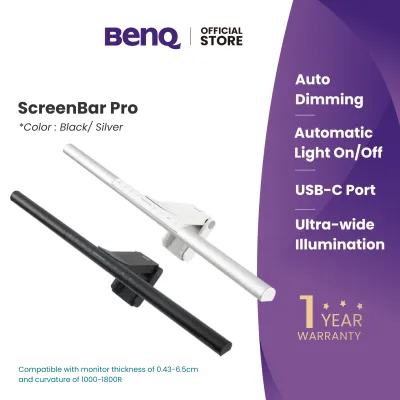
Monitor light bars (or screenbars) are a relatively modern category of workspace lighting. Unlike traditional desk lamps that sit on your desk surface, a monitor light bar clips directly onto the top bezel of your monitor. They use highly precise, asymmetric optical designs to project a narrow beam of light directly downward onto your keyboard area, completely avoiding the screen itself to eliminate all glare.
The primary advantage of a monitor light bar is space efficiency. Because it mounts on your monitor, it takes up zero desk space, making it the ultimate solution for extremely small or cluttered desks. However, because of their mounting position and compact size, screenbars have a limited illumination depth and width. They are designed to light the immediate area in front of your monitor, but they cannot effectively illuminate side documents, large books, or a wide, multi-monitor desk setup.
The BenQ WiT, as a full-size desk lamp, provides a much larger volume of light. It illuminates not only your keyboard but also the surrounding desk surface, making it far better suited for users who need to read physical textbooks, take handwritten notes, or work with physical materials alongside their screens. If desk space is your absolute highest priority and you only need to light your keyboard, a monitor light bar is highly efficient. If you require comprehensive workspace illumination, a full desk lamp like the WiT is necessary.
Decision Framework: Which Lamp Should You Choose?
To help you finalize your decision, use the following condition-based profiles to determine which premium desk lamp category best aligns with your workspace needs, habits, and physical environment.
Choose the BenQ WiT if:
- You use multiple monitors or an ultra-wide screen: The WiT's signature curved head is uniquely engineered to distribute light across a wide horizontal span, ensuring both ends of a wide setup are evenly illuminated.
- You frequently switch between digital and physical tasks: If your daily routine involves reading from a monitor, typing on a keyboard, writing in a physical journal, and reading a book, the wide, even light distribution will keep your entire desk comfortable.
- You prefer simple, localized automation: The built-in ambient light sensor provides highly effective auto-dimming with a simple touch of the metal ring, requiring no app configuration or smart-home setup.
- You have a large, sturdy desk: The lamp's heavy freestanding base or robust clamp requires a solid desk surface to support its weight and physical reach.
Choose an Architect or Traditional Task Lamp if:
- Your primary tasks are highly localized and physical: If you do detailed manual crafts, physical drafting, painting, or intricate assembly work, you will benefit from a highly concentrated, narrow spotlight that you can position close to your hands.
- You require extreme vertical and horizontal articulation: Traditional spring-loaded arms often offer more extreme, mechanical articulation angles than modern curved lamps.
- You prefer a classic, mechanical aesthetic: If your workspace features traditional wooden furniture or a vintage aesthetic, a classic metal architect lamp will fit the decor much better than a modern-industrial curved lamp.
Choose a Minimalist or Smart-Home Integrated Lamp if:
- Desk space is extremely limited: If you cannot use a clamp mount and do not have room for a heavy, wide desktop base, an ultra-slim minimalist lamp with a tiny footprint is highly practical.
- You want your lighting integrated into automated routines: If you want your desk lamp to turn on automatically when you enter your home office, dim at a specific time of night, or coordinate with other smart lights in your home, a connected smart lamp is essential.
- You prioritize a sleek, hidden aesthetic: If you prefer clean lines, hidden joints, and a lamp that blends seamlessly into a minimalist interior design, a high-end design-focused lamp is the ideal choice.
Verify First if:
- You are using a glass or fragile composite desk: Clamp mounts exert significant localized pressure. If your desk is made of glass, thin laminate, or hollow-core material, a clamp mount can crack or damage the surface. In these cases, a heavy freestanding base is much safer.
- Your desk has a highly beveled or curved edge: Most clamp mounts require a flat, square edge with a minimum depth to secure properly. If your desk has a decorative beveled edge or an under-desk support frame close to the edge, verify the clamp's minimum clearance specifications before buying.
- Your monitor has a non-standard bezel or built-in webcam: If you are considering a monitor-mounted light bar as an alternative, ensure your monitor's top bezel can accommodate the mounting clip without blocking the screen or damaging a built-in camera.
Pre-Purchase Checklist for Singapore Workspaces
Before investing in a premium desk lamp for your home office or workspace in Singapore, there are several practical, localized factors you must verify to ensure safety, compatibility, and long-term peace of mind.
Electrical and Plug Compatibility
Singapore’s standard domestic electrical supply operates at 230V AC with a frequency of 50Hz. When purchasing a premium desk lamp, especially from international online marketplaces or overseas sellers, always verify that the device is rated for this voltage range. Importing a lamp designed solely for 110V/120V markets (such as North America) without a proper voltage transformer can damage the lamp’s internal circuitry or pose a serious electrical safety hazard.
Additionally, ensure the lamp comes equipped with a safety-certified Type G (3-pin) plug suitable for Singapore socket outlets. Relying on cheap, uncertified travel adapters for high-end electronic devices is highly discouraged, as poor-quality adapters can lead to loose connections, electrical arcing, and potential fire risks. Look for products that carry the Enterprise Singapore Safety Mark to guarantee they have been tested and approved for safe local use.
Desk and Mounting Constraints
Many home offices in Singapore, particularly in HDB flats or condominiums, utilize compact desks ranging from 120cm to 140cm in width. If you plan to use a clamp mount to save valuable desk space, you must carefully measure your desk’s edge thickness and inspect the underside.
Popular standing desks (such as those from local brands like Omnidesk) often feature thick steel support frames running close to the edge of the tabletop. These frames can block standard desk clamps from securing properly. Ensure there is at least 5 to 8 centimeters of flat, unobstructed surface on the underside of your desk edge to accommodate the clamp’s pressure plate. If your desk has a built-in cable management tray or a modesty panel, verify that it will not interfere with the clamp’s vertical screw mechanism.
Warranty and Local Support
Premium desk lamps represent a significant financial investment, often costing between S$200 and S$400+. Given the cost, purchasing from authorized local distributors who offer an official Singapore warranty is highly recommended.
While parallel imports or purchasing directly from overseas sellers on ecommerce platforms may offer a slight upfront discount, they often come with significant risks. If the lamp develops a defect, has a flickering LED, or suffers a joint failure, parallel imports typically require you to ship the heavy unit back to the country of origin at your own expense for repairs. An official local warranty ensures you can access localized customer support, quick replacements, and authorized service centers right here in Singapore, protecting your investment for years to come.
Frequently Asked Questions (FAQ)
Does the BenQ WiT work well with ultra-wide monitors?
Yes, the BenQ WiT is specifically designed to perform exceptionally well with ultra-wide and multi-monitor setups. Its signature curved head distributes light in a wide, even arc that can cover a desk area up to 90 centimeters wide, ensuring that both the center and the outer edges of your workspace receive consistent illumination.
However, before purchasing, you must check the physical height of your monitor. Because the WiT sits on your desk surface (either via a base or a clamp), the lamp’s articulated arm must be adjusted so that the light head sits completely above the top bezel of your screen. If your ultra-wide monitor is exceptionally tall or mounted on a high monitor arm, verify that the WiT’s maximum vertical reach is sufficient to clear the top of the screen to prevent casting shadows or blocking your view.
Are premium desk lamps worth the investment for casual use?
For casual users who only spend an hour or two at their desk each day checking emails or browsing the web, a basic, mid-range desk lamp may be perfectly sufficient. The advanced optical engineering and ergonomic adjustments of a premium lamp are most beneficial during prolonged, intensive desk sessions.
However, if you work from home full-time, study for long hours, or frequently suffer from eye strain, dry eyes, or headaches, investing in a premium desk lamp is highly worthwhile. High-end lamps provide superior color rendering (typically CRI > 90), flicker-free performance, and precise glare control that directly reduce visual fatigue. Over the long term, the combination of robust metal build quality, advanced eye-comfort technology, and automatic dimming makes a premium lamp a highly valuable investment in your health, comfort, and productivity.
Community discussion
Share your experience or ask a question. Comments are reviewed before publication.