
Selecting the ideal smart digital table clock for your Singapore home or workspace requires balancing modern connectivity with everyday practicality. Unlike traditional alarm clocks, these connected devices serve as central information points, displaying everything from real-time weather updates to calendar events while integrating with your wider smart home ecosystem. Finding the right model involves assessing display technologies, ecosystem compatibility, and power requirements to ensure the device fits seamlessly onto your nightstand or desk. Whether you want a minimalist timekeeper that dims completely at night or a fully interactive smart hub to control your home appliances, understanding the key specifications will guide you to the right purchase.
Key Features to Evaluate in a Smart Digital Table Clock
When exploring the market for a smart digital table clock, the first step is identifying how the device will fit into your daily routine. Smart clocks generally fall into two categories: basic connected displays and advanced smart hubs. Basic models focus primarily on timekeeping, offering simple Wi-Fi synchronization to ensure the time is always accurate, alongside basic weather readouts and customizable alarms. These are ideal if you prefer a distraction-free environment, particularly on a bedside table where a bright, interactive screen might disrupt your sleep.
In contrast, advanced smart hubs feature full-color touchscreens, integrated voice assistants, and robust operating systems. These devices do far more than tell the time; they act as a central control panel for your smart home. With an advanced hub, you can stream live feeds from compatible security cameras, view digital photo albums, and manage other connected appliances like smart lights or robotic vacuums. If you want a device that serves as an interactive assistant on your study desk, an advanced smart hub offers the versatility needed to streamline your workflow.
Products mentioned in this guide
![[MQLITTLESHOP] Smart Digital Electronic Snooze Alarm Table Desk Clock Home Decor LED Small for Kids Living Room Bedroom with light loud](https://img.lazcdn.com/g/p/7815b8f88795162fe07300ad7b776d7b.jpg_400x400q80.jpg_.webp)
![[SG Stock] Smart Astronaut Bluetooth Speaker | Digital Alarm Clock & LED Night Light | 6W Hi-Fi Sound & FM Radio | AI Voice Intercom & TF Card Supported | Perfect Home Decor Gift](https://img.lazcdn.com/g/p/383127917cf390d2698500ae8b7e1700.png_400x400q80.png_.webp)
Prices are valid at publication and may change. Please refer to the product page for the latest price.
Audio capabilities are another essential consideration, especially if you plan to use your clock as a speaker for music, podcasts, or ambient sleep sounds. Compact smart clocks often feature small, basic speakers that are optimized for voice clarity and alarm tones but may sound thin when playing music. If audio quality is a priority, look for models that specify larger drivers or passive radiators to deliver a richer, more balanced sound profile. Alternatively, verify if the clock supports Bluetooth output, allowing you to route the audio to a high-quality external speaker while using the clock as a controller.
Software customization plays a significant role in how user-friendly a smart clock is over time. Look for devices that offer a wide selection of watch faces, allowing you to choose between classic analog designs, bold digital numbers, or minimalist layouts that match your room’s decor. Advanced models also support multi-step alarm routines, which can be customized to ease you into the day. For example, a morning routine can gradually increase the display brightness to mimic a sunrise, play a gentle alarm tone, and then automatically read out the weather forecast and your calendar events for the day.
Smart Ecosystem Compatibility and Connectivity
To get the most out of a smart digital table clock, it must integrate seamlessly with your existing smart home ecosystem. Most smart clocks are designed around a specific voice assistant, such as Google Assistant, Amazon Alexa, or Apple Siri. Choosing a clock that aligns with the ecosystem you already use ensures that you can control your existing smart bulbs, smart plugs, and air conditioners using simple voice commands. If you use a mix of different smart home brands, look for clocks that support open-standard protocols like Matter, which simplifies cross-brand compatibility and ensures more reliable local control.

Network connectivity is the foundation of any smart clock’s functionality. These devices rely on a continuous internet connection to sync the time, fetch weather data, and process voice commands. When reviewing specifications, check the Wi-Fi bands supported by the clock. While many budget-friendly models only connect to the 2.4 GHz band, dual-band models that support both 2.4 GHz and 5 GHz offer greater flexibility. The 2.4 GHz band is excellent for coverage through the solid concrete walls common in Singapore homes, while the 5 GHz band provides a faster, less congested connection if your router is nearby.
Bluetooth connectivity is another valuable feature to verify before purchasing. While Wi-Fi handles the smart integrations, Bluetooth is typically used for the initial setup process via a companion app on your smartphone. It also allows you to use the clock as a local Bluetooth speaker, enabling you to stream audio directly from your phone or tablet even if your home internet connection goes offline. Some advanced models also support Bluetooth pairing with wireless headphones, which is incredibly useful for watching videos or listening to music late at night without disturbing others.
Understanding the limitations of proprietary ecosystems is crucial when planning your smart home setup. Some manufacturers restrict certain features, such as video calling or casting media, to devices within their own product lineup. If you prefer not to be locked into a single brand, prioritize smart clocks that offer broad third-party app support and open APIs. This flexibility allows you to connect a wider variety of smart sensors, cameras, and entertainment systems, ensuring your smart clock remains a versatile hub as your technology needs evolve.
Display Types and Visibility for Different Environments
The type of display technology used in a smart clock directly affects its readability, power consumption, and suitability for different rooms. LED displays are highly common in basic smart clocks, offering bright, high-contrast numbers that are easy to read from across a room. However, standard LED screens can sometimes feel too bright in a dark bedroom, even at their lowest settings. LCD screens, particularly those with full-color backlighting, offer detailed information and vibrant visuals, making them excellent for displaying photos or calendar details on an office desk, though they can suffer from glare under bright overhead lighting.
For those who are highly sensitive to light while sleeping, e-ink displays present an excellent alternative. E-ink technology mimics the appearance of ordinary paper, reflecting ambient light rather than emitting it directly. This results in a display that is completely glare-free and exceptionally easy on the eyes, making it perfect for bright study rooms or offices. Because e-ink displays do not emit light, they require a built-in front light or backlight for nighttime viewing, which is typically much softer and less disruptive to sleep than standard LED or LCD screens.
An ambient light sensor is a critical feature to look for if you plan to place your smart clock on a bedside table. Clocks equipped with these sensors automatically detect the light levels in the room and adjust the screen brightness accordingly. During the day, the screen brightens to remain legible under direct sunlight; at night, it dims to a faint glow that won’t disrupt your sleep. If a model lacks an automatic sensor, verify if the companion app allows you to schedule specific dimming hours, ensuring the screen automatically enters a low-power, dark mode during your typical sleeping hours.
Screen size and resolution should be chosen based on your intended viewing distance and the available space on your table. A compact three- to four-inch display is ideal for a nightstand, as it provides enough space for the time and basic alerts without taking up too much room. For a study desk or kitchen counter, a larger seven- to eight-inch display is more practical, allowing you to read recipes, view calendar entries, or watch video clips comfortably from a distance. Ensure the resolution is high enough that text remains sharp and legible, preventing eye strain during daily use.
Power Options and Placement Considerations
Smart digital table clocks generally require a continuous, reliable power source to maintain their network connections and run background smart processes. The vast majority of these devices are AC mains-powered, meaning they must be plugged directly into a wall outlet. This configuration ensures uninterrupted operation and supports power-heavy features like continuous voice monitoring and high-brightness displays. Some compact models utilize a USB power cable, allowing you to power the clock using a standard USB wall charger, a computer port, or even a portable power bank, which offers greater placement flexibility.
When purchasing a smart clock from online retailers, it is vital to verify electrical compatibility with local Singapore standards. Singapore’s electrical grid operates at 230V and 50Hz, utilizing the Type G three-pin plug. Many smart clocks sold online are imported from overseas markets that use different voltages (such as 110V in the US or Japan) or different plug shapes. Always check the manufacturer’s specifications to ensure the power adapter is dual-voltage (labeled as 100V-240V) and prepare to use a compliant Type G adapter or a compatible local USB power supply to guarantee safe operation.
Cable management and the physical footprint of the clock are practical details that shouldn’t be overlooked. Because smart clocks need to be plugged in continuously, you will need to plan how to route the power cable neatly behind your desk or nightstand. Look for models with clever cable routing designs, such as recessed ports or angled plugs, which allow the clock to sit flush against a wall. Additionally, measure the physical dimensions of the clock to ensure it fits comfortably on your table without crowding other essential items like lamps, books, or personal devices.
While most smart clocks rely entirely on external power, some models include a built-in backup battery. This backup battery is not designed to run the smart features of the clock during daily use; instead, it serves as a safeguard during power outages. If the power goes out, the backup battery keeps the internal clock running and ensures your pre-set alarms will still sound on time. If you live in an area prone to occasional power fluctuations, choosing a model with a battery backup provides an extra layer of reliability for your morning routine.
Pre-Purchase Checklist for Online Shoppers
Buying a smart digital table clock from online marketplaces requires careful verification to ensure you receive a fully functional device compatible with your home. First, cross-reference the manufacturer’s specifications to check for region locks or geo-restrictions. Some smart clocks designed for overseas markets may have restricted voice assistant capabilities, limited language support, or may not connect to local servers, which can render many of their smart features useless in Singapore. Always confirm that the companion app is officially available for download in your local mobile app store.
Review the warranty terms and return policies thoroughly before finalizing your purchase, especially when buying from cross-border sellers or third-party merchants. A local manufacturer’s warranty is highly desirable, as it allows you to easily seek repairs or replacements if the device develops a hardware fault. If you are purchasing an imported model, check if the seller offers a store warranty and understand the process for returning a defective item, including who covers the return shipping costs.
Finally, read through user reviews specifically looking for feedback on long-term software support and app stability. A smart clock’s performance is heavily dependent on its companion app and firmware updates. Look for reviews that mention how often the manufacturer releases software updates, whether the app is prone to crashing, and how easy it is to navigate the settings. Additionally, pay attention to privacy-related feedback, ensuring the device offers clear controls over data collection and microphone usage so you can use your smart clock with complete peace of mind.
Frequently Asked Questions (FAQ)
Do smart digital table clocks work without a Wi-Fi connection?
Most smart digital table clocks require an active Wi-Fi connection to access their full range of smart features, such as voice assistants, weather updates, and smart home integrations. However, basic functions like displaying the current time and sounding pre-set local alarms will typically continue to work offline. Keep in mind that without an internet connection, you will not be able to adjust settings via the companion app, stream music, or receive real-time notifications until the connection is restored.
Can I use a smart table clock to monitor indoor temperature and humidity?
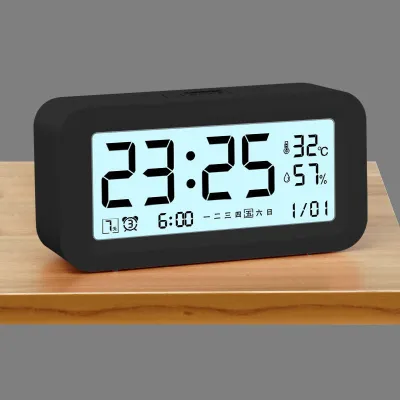
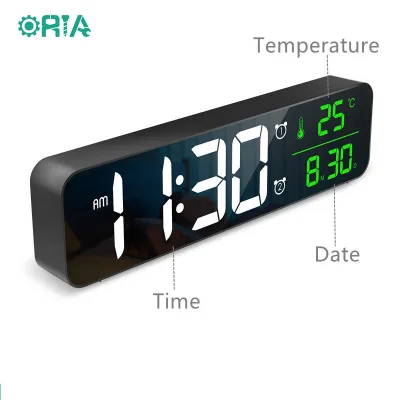
Yes, some smart table clocks come equipped with built-in environmental sensors that display real-time indoor temperature and humidity directly on the screen. For models that do not have these sensors built-in, you can often pair them with compatible external smart sensors within the same ecosystem. Always check the product specifications carefully to verify whether environmental tracking is built into the clock or requires additional hardware.
How do I manage privacy and mute the microphone on a smart clock?
Managing your privacy on a smart clock is straightforward on most modern devices. Many models feature a physical hardware mute switch or button that physically disconnects the microphone, often indicated by a red light or an on-screen icon. Additionally, you can log into the companion app to adjust privacy settings, delete voice recording history, and disable specific data-sharing features to ensure your personal information remains secure.

Community discussion
Share your experience or ask a question. Comments are reviewed before publication.