
Choosing the right BenQ desk lamp depends entirely on whether your daily tasks center on digital screens, physical books, or a combination of both. While some models are designed to clamp onto monitors to save space and eliminate screen glare, others feature wide, curved heads engineered to cast even light across expansive study desks. Identifying your primary task is the first step toward selecting a lighting setup that prevents eye strain and fits your workspace.
To make an informed decision, you must evaluate your physical desk layout, understand how different lamp designs direct light, and verify technical specifications like voltage compatibility and mounting requirements. This guide provides a practical framework to help you match your specific workflow with the appropriate lamp category, ensuring your investment enhances both comfort and productivity.
Identifying Your Primary Desk Lighting Need
Before comparing specific lamp designs, you must analyze how you interact with your workspace. A student reading physical textbooks requires a completely different lighting environment than a software engineer or digital designer staring at a monitor for hours. Understanding these distinctions prevents common issues like screen glare, harsh shadows, and uneven illumination.
Products mentioned in this guide
![[New] BenQ ScreenBar Halo 2 | Monitor Light | Wireless Control | Auto Dimming & Auto On/Off | Back Light | Desk Lamp | 3 Light Modes](https://img.lazcdn.com/g/p/3efb87ef278da69695a8c36fca44e243.png_400x400q80.png_.webp)
Prices are valid at publication and may change. Please refer to the product page for the latest price.
For screen-heavy work, your primary goal is to minimize reflections and glare on the display. Standard desk lamps often cast light directly onto the screen, causing washed-out colors and forcing your eyes to strain to read text. To combat this, look for lighting solutions that project light downward at a precise angle, illuminating the keyboard and desk surface while keeping the monitor screen entirely in shadow.
Paper-based studying, drafting, or sketching demands a broad, highly uniform distribution of light. When you write or read physical documents, shadows cast by your hands, pens, or the lamp’s own arm can cause significant visual fatigue. A lamp with a wide, curved light source or a highly adjustable arm allows you to position the light directly overhead, casting a wide pool of illumination that eliminates dark spots across your entire working area.
Your physical desk dimensions also play a critical role in your choice. A compact desk, typical in many Singapore home offices or study corners, has limited surface area. Occupying valuable space with a heavy lamp base can restrict your movement and clutter your workspace. Conversely, a deep or wide executive desk requires a lamp with a long reach and a substantial base or clamp to ensure the light can be directed exactly where it is needed.
Finally, consider whether the workspace is dedicated to a single user or shared among family members. A shared study table in a family home often needs to accommodate different tasks throughout the day, from a child’s homework to an adult’s remote work. In these scenarios, versatility is key; you will need a lamp that offers easy adjustments in height, angle, brightness, and color temperature to suit various preferences and activities.
Key Specifications to Verify Before Buying
When investing in high-quality desk lighting, verifying technical specifications is essential to ensure safety, compatibility, and optimal performance. Electrical standards and user preferences vary, so checking these details before making a purchase prevents compatibility issues and ensures the lamp functions safely in your home.

First, verify the local voltage compatibility and plug type. In Singapore, the standard domestic electricity supply operates at 230V with a frequency of 50Hz, utilizing Type G three-pin plugs. When purchasing premium lighting equipment, always confirm that the power adapter supplied with the lamp is certified for this voltage and features the correct plug. Using uncertified adapters or relying on unstable travel adapters can pose electrical safety risks and potentially damage the lamp’s internal circuitry.
Second, examine the color temperature range and brightness adjustability. A versatile desk lamp should offer a wide range of color temperatures, typically measured in Kelvin (K). Warm light (around 2700K to 3000K) is gentler on the eyes and is ideal for late-night reading or relaxing, as it minimizes blue light exposure before sleep. Cool white light (around 5000K to 6000K) mimics daylight and is excellent for high-focus tasks, studying, and daytime work. Ensure the lamp allows for smooth, step-less dimming or multiple brightness levels so you can adjust the output as ambient natural light changes throughout the day.
Third, review the manufacturer’s stated power consumption and required adapter specifications. Modern LED desk lamps are highly energy-efficient, but they still require stable power delivery. Some models use standard USB-C connections, while others rely on proprietary DC adapters. If you plan to power the lamp via a computer monitor’s USB port or a multi-port USB charger, verify that the port can supply the minimum wattage and amperage specified by the manufacturer to prevent flickering or automatic shutoffs.
Matching BenQ Lamp Categories to Your Workflow
To simplify your decision, you can categorize the available lighting options into three distinct form factors. Each category is engineered to address specific workspace challenges, and understanding their strengths allows you to select the design that aligns perfectly with your daily routine.
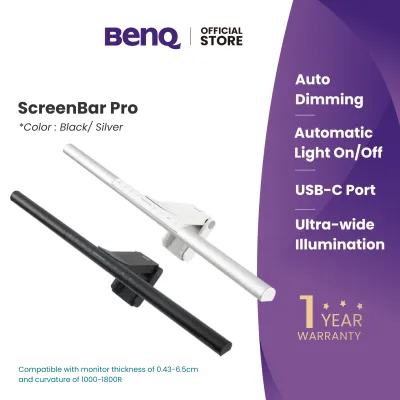
Monitor light bars represent a modern approach to workspace illumination, designed specifically for computer users. These compact fixtures clip directly onto the top bezel of your monitor, requiring zero desk space. They utilize an asymmetrical optical design that projects light downward and forward, illuminating your desk and keyboard while completely avoiding the screen surface. This eliminates screen glare and reflections, making them the ideal choice for programmers, writers, and office professionals. However, before choosing this option, you must verify your monitor’s bezel thickness and whether the back of the screen is curved, as some mounting clips are optimized for flat displays.
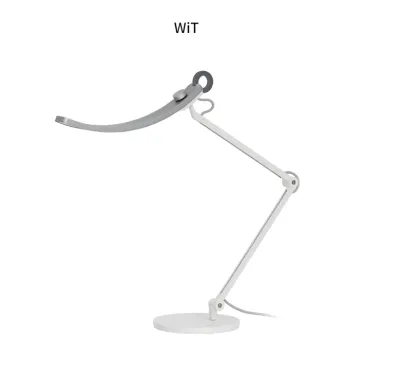
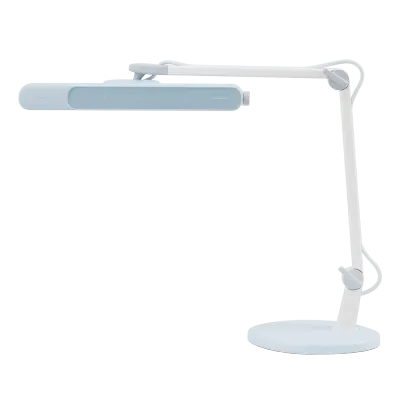
Broad-coverage desk lamps are the traditional workhorses of the study room, featuring wide, curved light heads and highly flexible, articulated arms. These lamps are designed to sit on your desk or clamp to the edge, extending high above your workspace to cast a massive, even pool of light. This form factor is perfect for students, architects, and artists who need to spread out textbooks, drawings, and digital devices simultaneously. The wide light distribution ensures that your entire desk is illuminated uniformly, reducing the contrast between your work and the surrounding environment. When considering this category, check the lamp’s maximum arm reach and the physical footprint of its base to ensure it fits your desk layout.
Focused reading lamps are tailored for dedicated, localized tasks such as reading physical books, crafting, or detailed assembly work. These lamps typically feature smaller, highly adjustable heads that allow you to direct a concentrated beam of light onto a specific area. This is highly beneficial when you want to read in a dimly lit room without disturbing others nearby. When evaluating focused reading lamps, pay close attention to the beam angle and the ease of adjusting the lamp head, ensuring you can position the light precisely to avoid casting shadows over your work.
Desk Space, Mounting, and Installation Checks
Once you have identified the right lamp category, you must perform a physical audit of your workspace to ensure the lamp can be installed safely and securely. Failing to check these physical constraints can lead to unstable mounting, damaged equipment, or a cluttered desk.
Begin by comparing freestanding bases against desk clamps. A freestanding base offers the ultimate flexibility, allowing you to place the lamp anywhere on your desk and move it easily. However, these bases are often heavy and occupy a significant amount of desk space. A desk clamp is an excellent alternative that secures the lamp to the edge of your desk, freeing up valuable surface area. Before choosing a clamp, measure your desk’s thickness and inspect the underside of the table. Some desks have metal support frames, drawers, or backboards that can prevent a clamp from securing tightly.
If you are opting for a monitor light bar, compatibility checks are even more critical. Ensure the mounting clip does not obstruct your monitor’s built-in webcam or sensitive sensors. If you use a curved monitor, standard light bar clips may not sit securely or may cast light onto the upper corners of the screen. In this case, look for light bars that include specialized adapters or are specifically designed to accommodate the unique radius of curved displays. Additionally, if you use a dual-monitor setup or have your monitor mounted on a VESA arm, verify that the light bar’s weight and mounting mechanism will not interfere with the arm’s balance or movement.
Finaly, plan your cable routing carefully. Desk lamps and light bars require a continuous power supply, and dangling cables can create visual clutter and physical hazards. Ensure the power cable is long enough to reach your outlet or power strip without being stretched taut. If the lamp features an adjustable arm, leave enough slack in the cable to allow the arm to move through its full range of motion without pulling on the power connector. Using cable clips or routing sleeves can help keep your workspace organized and protect the power cable from wear and tear over time.
Frequently Asked Questions (FAQ)
Can I replace the LEDs in a BenQ desk lamp if they burn out?
Most modern high-end desk lamps, including those from BenQ, feature integrated LED light sources rather than traditional screw-in bulbs. These LEDs are permanently soldered to the internal circuit board to optimize heat dissipation, energy efficiency, and light distribution. While this means you cannot replace the LEDs yourself, they are engineered to last for tens of thousands of hours of continuous use under normal conditions. Before purchasing, it is advisable to check the manufacturer’s warranty terms and the rated lifespan of the specific model to understand your long-term coverage.
Do BenQ desk lamps require a specific app or smart home hub to function?
The vast majority of these desk lamps are designed to operate completely out of the box without requiring a smart home hub, internet connection, or mobile application. Basic functions—such as turning the lamp on and off, adjusting brightness, and changing color temperature—are controlled via physical buttons, touch-sensitive panels, or dedicated wireless desktop dials included with the lamp. If a specific model offers advanced smart features or app integration, this will be clearly stated in the product specifications, and you should consult the user manual to verify the required wireless protocols and device compatibility.
How do I clean the light bar or lamp head without damaging the finish?
To clean your lamp safely, always begin by unplugging it from the power source to eliminate any risk of electrical shock. Use a clean, dry, lint-free microfiber cloth to gently wipe away dust from the outer housing, the lamp arm, and the optical lens. For stubborn smudges or fingerprints, you can slightly dampen the microfiber cloth with plain water, ensuring it is not dripping wet. Never spray water or cleaning liquids directly onto the lamp, and avoid using harsh chemical solvents, alcohol, or abrasive cleaners, as these can permanently degrade the matte finish and damage the sensitive optical components. Always refer to the user manual for specific material care instructions.
Community discussion
Share your experience or ask a question. Comments are reviewed before publication.