
Evaluating how a kodak photo frame integrates into your home requires weighing classic styling against modern smart features. If you are looking to display treasured memories, the right choice often comes down to a fundamental preference: do you want a digital frame that looks like a traditional, high-quality wooden picture frame, or do you prefer a sleek, tablet-like smart display?
Kodak digital frames generally appeal to users who prioritize classic, traditional aesthetics and straightforward, low-friction photo sharing, such as direct email uploads or simple plug-and-play USB options. In contrast, typical smart frame competitors often lean toward modern, minimalist designs and feature-rich, multi-user cloud ecosystems. The best choice depends entirely on whether you value a nostalgic, furniture-like design that blends with traditional decor, or a cutting-edge smart device with touchscreen controls and advanced app integrations.
Design and Aesthetics: Blending with Your Wall Decor
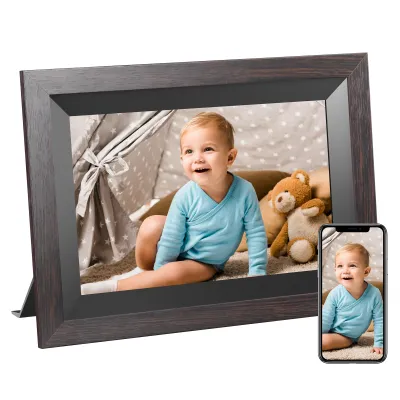
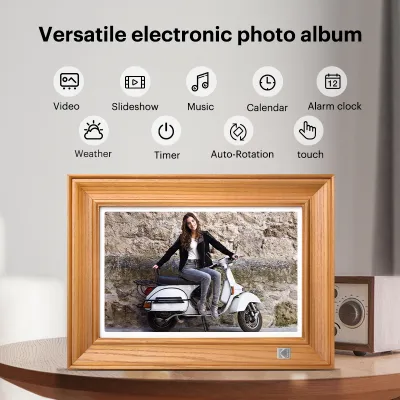
When selecting a digital photo frame, physical appearance is just as important as screen technology. A digital frame is, first and foremost, a piece of home decor that sits on your mantelpiece, console table, or hangs on your wall. Kodak has carved out a distinct niche by leaning heavily into traditional design language. Many models in their lineup feature genuine wood-grain finishes, wide classic bezels, and textured matting options that closely mimic traditional, non-digital picture frames. This design philosophy makes them exceptionally well-suited for classic, rustic, transitional, or warm organic interior styles where high-tech gadgets might otherwise look out of place.
Products mentioned in this guide

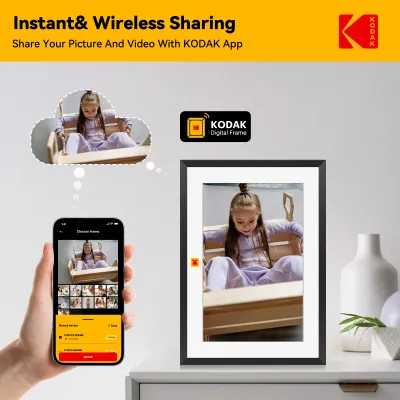

Prices are valid at publication and may change. Please refer to the product page for the latest price.
In contrast, many modern competitor brands design their frames to look like sleek, contemporary art pieces or ultra-thin tablets. These competitors often feature bezel-less glass fronts, metallic borders, or flat, matte-black profiles. While these minimalist designs look stunning in contemporary or industrial-style homes, they can sometimes feel cold or overly technical in a cozy, traditionally styled living room.
Before making a purchase, it is essential to verify the physical dimensions of the frame, including the depth of the casing. Traditional-style frames, including several Kodak options, tend to have a thicker profile to accommodate their classic molding. This extra depth requires stable, flat surfaces if you plan to use the built-in kickstand. If you are placing the frame on a narrow shelf, a shallow mantelpiece, or a crowded sideboard, a thicker frame might limit your placement options.
Additionally, consider the stability of the stand in both portrait and landscape orientations. Some frames utilize a screw-in peg stand, while others feature a fully adjustable, integrated hinge. If you plan to rotate your frame frequently to match the orientation of your photos, verify how the stand behaves in both positions. For homes in Singapore, where space on console tables and built-in shelving can be highly curated, measuring the physical footprint of the frame—including the clearance needed for the power cable to plug into the back—will prevent unexpected placement issues.
Display Quality and Core Features: Evaluating the Screen
Beyond the outer frame, the quality of the display screen determines how lifelike and vibrant your photos will appear. When comparing a kodak photo frame to its competitors, pay close attention to the underlying panel technology. Most mid-to-high-range digital frames utilize In-Plane Switching (IPS) panels. IPS technology is crucial for digital frames because it provides wide viewing angles, typically up to 178 degrees. This ensures that family members walking across the living room or sitting at an angle will see accurate colors and sharp details, rather than a washed-out, inverted image common in cheaper Twisted Nematic (TN) panels.

Resolution and aspect ratio are equally critical factors to verify on the product specification sheet:
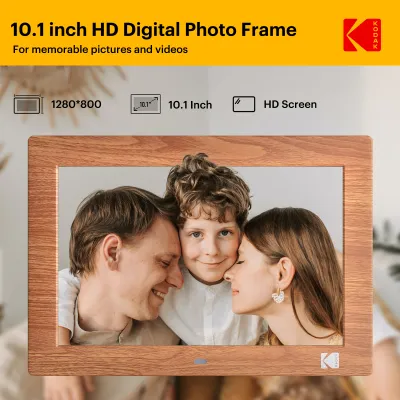
- Resolution: Look for at least HD resolution (typically 1280×800 pixels for a 10-inch screen) or Full HD (1920×1080 pixels) for larger displays. Higher pixel density ensures your photos look crisp even when viewed from a short distance.
- Aspect Ratio: Many digital frames use a 16:10 or 16:9 widescreen aspect ratio. However, standard smartphone photos are typically captured in a 4:3 or 3:2 aspect ratio. When a 4:3 photo is displayed on a 16:9 screen, the frame must either crop the top and bottom of the image or display black bars (letterboxing) on the sides. Some frames offer smart-cropping features, while others preserve the original image with blurred side borders. Verify how a frame handles these formatting differences to avoid awkward crops of family faces.
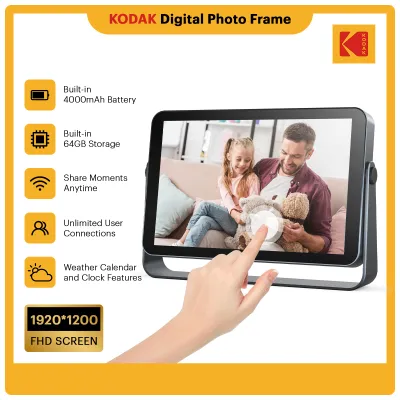
Control interfaces also differ significantly across brands. Many modern competitor frames rely entirely on touchscreen interfaces, which make navigating menus, inputting Wi-Fi passwords, and liking photos highly intuitive. However, touchscreens are highly susceptible to unsightly fingerprints and smudges, which can detract from the viewing experience—especially in bright, sunlit rooms. To combat this, some traditional frames, including specific Kodak models, utilize physical remote controls or tactile buttons hidden on the back of the frame. While less modern, a remote control keeps the screen pristine and free of oil smudges.
Finally, check the product label for integrated sensors that enhance daily usability. An auto-rotate sensor is essential, as it automatically detects whether the frame is placed horizontally or vertically and adjusts the photo orientation accordingly. Adjustable brightness controls—ideally paired with an ambient light sensor—will automatically dim the screen at night and brighten it during the day. Motion sensors (often Passive Infrared or PIR sensors) are also highly valuable; they turn the screen off when no movement is detected in the room, saving energy and preserving the lifespan of the display panel.
Connectivity, Apps, and Cloud Ecosystem: The Daily Experience
The software ecosystem dictates how easy it is to get photos from your smartphone or computer onto the digital frame. Kodak frames typically offer a straightforward companion app or a dedicated email address assigned to the frame. This email-to-frame feature is incredibly convenient for families; relatives can simply email photos directly to the frame’s unique address, and they will automatically appear in the slideshow. This low-friction setup is highly favored by users setting up frames for elderly parents or less tech-savvy family members.
On the other hand, several competitor brands focus on highly integrated, multi-user cloud ecosystems. These platforms often allow you to curate complex playlists, create collaborative family albums, and sync directly with cloud storage services like Google Photos, Apple Photos, or social media platforms. While highly versatile, these advanced ecosystems can sometimes feel overwhelming to navigate and may require a more hands-on setup process.
Cloud storage limits and subscription models are vital details to verify before purchasing. Some smart frame brands offer free, unlimited cloud storage for photos, but charge a recurring monthly subscription fee for video playback, extended storage, or advanced features. Other brands, including many Kodak models, focus heavily on local storage options alongside basic cloud features. If you prefer to avoid ongoing subscription fees, verify whether the frame supports physical media, such as SD/SDHC cards or USB flash drives.
Local storage is also an excellent option for those with strict privacy and data security preferences. If you are uncomfortable hosting personal family photos on third-party cloud servers, a frame that can run entirely offline via an SD card provides absolute peace of mind. When evaluating any connected frame, take a moment to review the manufacturer’s privacy policy to understand how your photos are encrypted, stored, and managed on their servers.
Design and Feature Comparison Matrix
To help you synthesize these differences, the following matrix compares the general profiles of Kodak digital frames against typical smart frame competitors. Because features can vary across specific models, use this table as a starting point to guide your verification of individual product specification sheets.
| Feature/Dimension | Kodak Photo Frames (General Profile) | Typical Smart Competitors (General Profile) | What to Verify on the Spec Sheet |
|---|---|---|---|
| Design Style | Classic, traditional wood-grain or textured borders; deeper profile. | Modern, minimalist, flat-panel glass or metallic thin bezels. | Outer dimensions, frame depth, and available frame materials/finishes. |
| Control Interface | Often utilizes remote controls, back buttons, or selective touchscreens. | Primarily capacitive touchscreens with gesture support. | Presence of physical remote vs. touchscreen; ease of menu navigation. |
| Primary Sharing Method | Direct email-to-frame, basic companion app, and local media. | Highly integrated multi-user apps, cloud syncing, and social media links. | Companion app compatibility, setup requirements, and user invite limits. |
| Local Storage Focus | Strong support for SD/SDHC cards and USB flash drives. | Cloud-first design; limited or hidden local media slots. | Maximum supported SD card capacity (e.g., up to 32GB) and USB port type. |
| Ideal Room Style | Warm, traditional, rustic, transitional, or classic wooden interiors. | Contemporary, ultra-modern, minimalist, or gallery-style spaces. | Stand stability in portrait/landscape and wall-mounting options. |
How to Choose: Decision Framework for Your Home
To make your final decision, evaluate your home environment, technical comfort level, and aesthetic preferences against these condition-based guidelines.
Choose a Kodak photo frame if:
- You prefer a classic, furniture-like aesthetic that seamlessly blends with traditional wooden furniture, warm textures, and classic home decor.
- You want a simple, low-friction setup where distant family members can easily send photos via email without needing to navigate complex smart home apps.
- You prefer to load photos locally using SD cards or USB drives, allowing the frame to operate reliably without a constant internet connection.
- You want to keep the screen free of fingerprints by using a physical remote control or rear buttons.
Choose a competitor brand if:
- Your home features a highly modern, minimalist, or contemporary design that suits sleek, bezel-less, or tablet-style displays.
- You want advanced, collaborative cloud features, such as syncing directly with shared Google Photos albums or curating complex multi-user playlists.
- You prefer intuitive, on-screen touchscreen controls for quick adjustments and photo browsing.
- You are comfortable managing your device through a dedicated smart home application and potentially paying a subscription for premium features.
Verify first before purchasing:
- Power and Voltage Compatibility: If you are purchasing a digital frame from international online marketplaces or cross-border stores for use in Singapore, always verify the electrical specifications. Ensure the power adapter supports a 230V, 50Hz input and features a compatible Type G plug. If the frame comes with a non-standard plug, ensure you use a safety-certified adapter rather than unbranded alternatives to prevent electrical hazards.
- Wall Mounting Requirements: If you plan to hang the frame on a wall, check the back of the casing. Traditional frames often feature basic keyhole slots for hanging, whereas some modern frames support standardized VESA mount patterns. Ensure the frame's weight is compatible with your wall anchors, and plan how to route the power cable safely and neatly to the nearest electrical outlet.
- Aspect Ratio and Cropping: Check the native aspect ratio of the screen and compare it to the format of your primary photo source (such as your smartphone camera) to ensure you are comfortable with how the frame displays non-matching image sizes.
Frequently Asked Questions (FAQ)
Do Kodak digital frames require a constant Wi-Fi connection to display photos?
No, a constant Wi-Fi connection is not strictly mandatory for daily playback, though it depends on how you load your photos. While a Wi-Fi connection is required to receive new photos sent via the companion app or email, most Kodak frames store downloaded photos in their internal memory. Furthermore, if you load your photos directly onto a compatible SD card or USB flash drive, the frame can display your slideshow completely offline. Always check the specific model’s internal storage capacity and local media compatibility to ensure it matches your offline viewing preferences.
Can I mount a Kodak photo frame on the wall?
Many traditional-style Kodak digital frames feature integrated keyhole slots on the back, allowing them to be hung on a wall in either portrait or landscape orientation. However, because digital frames require a continuous power source, you must plan how to route the power cable safely and discretely to a nearby electrical outlet. Before hanging, verify the total weight of the frame and use appropriate wall anchors suited for your wall type (such as drywall or concrete). If you plan to use specialized, heavy-duty brackets or articulating arms, check the product specifications to see if the frame supports standard VESA mounting patterns.
Community discussion
Share your experience or ask a question. Comments are reviewed before publication.