
Deciding whether to invest in the Philips Hue Go or opt for an alternative portable smart lamp depends heavily on your existing smart home setup and your specific lighting goals. The Philips Hue Go is a highly capable portable lamp, particularly if you already use the Philips Hue ecosystem and value complex, dynamic light scenes that sync across multiple rooms. However, if you are looking for a straightforward, budget-friendly option that works right out of the box without an additional hub, several alternative portable lamps on the market may serve you better.
To determine the best path forward, you must weigh the long-term value of ecosystem integration against the immediate convenience of standalone Wi-Fi or Bluetooth devices. While the Hue Go offers deep customization and reliable performance, alternative lamps often provide simpler setups and lower entry costs. Ultimately, the right choice is conditional on your current smart home hardware, your budget, and how you plan to use portable lighting in your living spaces.
Smart Capabilities and Ecosystem Integration
When comparing portable smart lamps, the underlying control technology is one of the most critical factors to evaluate. The Philips Hue Go operates on two primary wireless protocols: Bluetooth and Zigbee. If you use the lamp via Bluetooth, you can control it directly from your smartphone within a limited physical range. To unlock its full suite of smart capabilities—such as out-of-home control, advanced scheduling, and synchronization with media—you must connect it to a Philips Hue Bridge. This dedicated hub translates Zigbee signals into commands your home router can understand, but it represents an additional hardware investment if you do not already own one.
Products mentioned in this guide
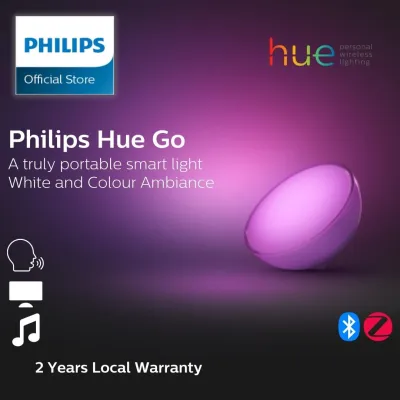

![[Latest Bluetooth Version] Philips Hue GO/ Portable Light/ 16 Million color Smart LED Light](https://img.lazcdn.com/g/p/4ff58888f9dd044302eee591bed0f0a3.png_400x400q80.png_.webp)
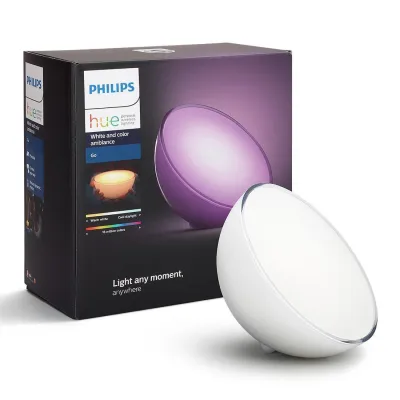
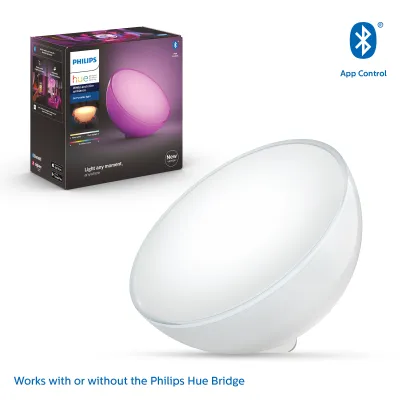
Prices are valid at publication and may change. Please refer to the product page for the latest price.
In contrast, many alternative portable smart lamps utilize direct Wi-Fi connections or newer smart home standards like Matter over Thread. A Wi-Fi-enabled portable lamp connects directly to your home router, eliminating the need for a proprietary hub and allowing remote control from anywhere with an internet connection. However, a high volume of Wi-Fi smart devices can sometimes crowd your home network, potentially leading to latency issues. If you are looking for a future-proof setup, check alternative lamps for Matter compatibility. Matter-certified devices are designed to work seamlessly across different smart home platforms, such as Apple Home, Google Home, and Amazon Alexa, without requiring brand-specific hubs.
App features also vary significantly across different smart lighting brands. When researching alternatives, look at the manufacturer’s companion app to see if it supports custom scene creation, automated routines, and smooth dimming transitions. Some platforms offer pre-programmed dynamic scenes that mimic natural phenomena like candlelight or forest paths, similar to the Hue app’s signature effects. Additionally, verify whether the lamp integrates with your preferred voice assistant. While most major brands support basic voice commands, the depth of integration—such as the ability to trigger complex lighting scenes via a single voice prompt—often depends on the maturity of the brand’s software ecosystem.
Brightness, Color, and Light Quality Standards
Evaluating the visual performance of a portable smart lamp requires looking closely at product specifications rather than relying on marketing descriptions. To gauge the maximum brightness of any lamp, locate the lumen rating on the product packaging or technical datasheet. Lumens measure the total amount of visible light emitted by a source. Portable smart lamps typically range from 100 to over 500 lumens when plugged into a power source. Keep in mind that many portable models automatically reduce their maximum lumen output when running on battery power to conserve energy, so it is essential to verify both plugged-in and battery-operated brightness levels.

Color quality is another area where portable lamps differ. When comparing options, check the color temperature range, which is measured in Kelvin (K). A versatile lamp should offer a wide spectrum, typically from a warm 2,000K (resembling candlelight) to a cool 6,500K (similar to daylight). This range allows you to adjust the lighting to suit different tasks, from relaxing in the evening to focusing on work. Furthermore, examine the color gamut specifications. While standard RGB (Red, Green, Blue) lamps can produce a wide array of colors, models that utilize RGBW (which includes dedicated white LEDs) generally offer much cleaner, more natural white light and better color saturation.
For spaces where color accuracy is important, such as a reading nook or a dining area, look for the Color Rendering Index (CRI) rating. CRI is a quantitative measure of a light source’s ability to reveal the colors of objects faithfully in comparison with a natural light source. A CRI rating of 80 or above is standard for home lighting, while a rating of 90 or higher indicates excellent color rendering. High-CRI portable lamps ensure that fabrics, wood grains, and food look natural and vibrant under their glow, which can significantly enhance the overall aesthetic of your room.
Portability, Battery Life, and Power Specifications
Because these lamps are designed to be moved from room to room, physical portability and battery performance are paramount. When reviewing manufacturer specifications, pay close attention to the estimated battery runtime at various brightness levels. A lamp that claims up to 48 hours of battery life may only achieve this duration at its lowest nightlight setting. At maximum brightness, that same lamp might only last for two to three hours. Always look for detailed runtime breakdowns to ensure the battery life aligns with your intended usage, whether that is a full evening of outdoor dining or a quick bedside reading session.
Charging methods also play a significant role in daily convenience. The Philips Hue Go features a specific charging port design, and newer versions often include a convenient charging dock that the lamp sits on. While a dedicated dock makes it easy to grab the lamp and go, it also means you must carry the proprietary charger if you plan to travel with it. Many alternative portable lamps utilize standard USB-C charging ports. USB-C compatibility offers excellent flexibility, as it allows you to charge the lamp using the same cables and power banks you use for your smartphone or laptop, making them highly practical for travel or outdoor use.
Finally, assess the physical design and durability of the lamp. Consider the overall weight and base stability; a lamp with a bottom-heavy design is less likely to tip over on uneven surfaces. If you plan to use the lamp in damp environments, such as a bathroom or a covered patio, check the Ingress Protection (IP) rating. An IP rating consists of two numbers: the first indicates protection against solid particles like dust, and the second indicates protection against liquids. For instance, a rating of IP20 is suitable only for dry indoor areas, whereas an IP44 rating indicates protection against splashing water, making the lamp much more versatile for transitional indoor-outdoor spaces.
Evaluating Price and Long-Term Value
To determine the true value of a portable smart lamp, you must look beyond the initial retail price and calculate the total cost of ownership. If you choose the Philips Hue Go and do not already own a Hue Bridge, you may eventually need to purchase one to access the lamp’s full smart features, which adds to your overall expenditure. When comparing this to standalone Wi-Fi or Bluetooth lamps, the initial investment for the Hue ecosystem can be higher. However, if you plan to expand your smart lighting setup to multiple rooms in the future, investing in a robust, hub-based system can provide superior stability and faster response times than a collection of individual Wi-Fi bulbs.
For budget-conscious shoppers, standalone portable lamps that connect directly to your home network often represent a more economical entry point. These lamps allow you to enjoy smart features like scheduling and voice control without any upfront hardware additions. When evaluating these alternatives, compare the warranty terms offered by different manufacturers. A longer warranty period, such as two years, can provide peace of mind and indicate a higher level of build quality.
To find the most accurate pricing and value, verify current retail prices, bundle deals, and warranty policies directly on official brand websites or authorized e-commerce platforms. Avoid relying on third-party resellers who may inflate prices or offer limited warranty support. Keep an eye out for starter kits or multi-pack bundles, which can significantly lower the cost per device if you are planning a larger home lighting upgrade.
Final Decision Framework: Which Portable Lamp Fits Your Setup?
To simplify your decision, use this structured framework to match your specific needs with the right portable smart lamp category.
Choose the Philips Hue Go if:
- You already own a Philips Hue Bridge and want to integrate the portable lamp seamlessly into your existing home entertainment or room scenes.
- You prioritize highly polished, dynamic lighting effects and smooth, flicker-free dimming transitions.
- You want a reliable, hub-based connection that does not put extra strain on your home Wi-Fi router.
Choose alternative portable smart lamps if:
- You prefer a straightforward, hub-free setup that connects directly to your Wi-Fi network or uses standard Bluetooth.
- You are working within a strict budget and want to avoid the additional cost of a proprietary smart hub.
- You require standard USB-C charging for maximum portability and travel convenience.
- You need a lamp with a specific rugged design or a high IP rating for frequent outdoor use.
Verify first if:
- Your home router can support additional Wi-Fi devices if you choose a hub-free alternative.
- The physical dimensions and weight of the lamp fit your intended placement, such as narrow shelves or small bedside tables.
- The electrical certifications and voltage requirements of the lamp match your local household standards before making a purchase.
Frequently Asked Questions (FAQ)
Can I use the Philips Hue Go without a Hue Bridge?
Yes, you can use the Philips Hue Go without a Hue Bridge by utilizing its built-in Bluetooth capability or the physical button on the back of the device. When connected directly via Bluetooth to your smartphone, you can control the lamp, adjust brightness, and select from a variety of preset light scenes within standard Bluetooth range. However, this setup has limitations. You will not be able to control the lamp when you are away from home, set up complex automation routines, or sync the light with your TV or gaming setup. To access these advanced features, integrating the lamp with a Philips Hue Bridge is required.
Do portable smart lamps work outdoors?
Whether a portable smart lamp can be used outdoors depends entirely on its Ingress Protection (IP) rating. Before exposing any lamp to outdoor conditions, check the manufacturer’s label for its specific IP rating. Lamps rated IP20 are strictly for indoor use and should not be exposed to moisture or dust. Lamps with an IP44 rating or higher are protected against splashing water and can be used in damp outdoor environments, such as covered patios or balconies. Always ensure that any charging port covers are securely closed before taking the lamp outside, and never charge a portable lamp in wet conditions or expose its charging dock to rain.
Community discussion
Share your experience or ask a question. Comments are reviewed before publication.