
Finding the right monitor light bar for your desk setup often comes down to balancing your workspace constraints, monitor design, and budget. The BenQ ScreenBar Halo 2 represents a premium tier of desk lighting, designed specifically to address complex setups like curved screens and precise glare reduction. However, whether it is the right choice for your desk depends on your specific hardware and how you use your workspace.
For users with curved or ultrawide monitors who require highly uniform light distribution without screen reflections, investing in a premium model like the Halo 2 is highly compelling. Its specialized mounting geometry and advanced optical design are engineered to keep light off the screen glass. Conversely, if you use a standard flat monitor for basic administrative tasks, a more budget-friendly alternative from another brand may easily suffice, saving you money that could be better spent elsewhere on your desk setup.
Key Dimensions to Compare Monitor Light Bars
When comparing the BenQ ScreenBar Halo 2 against other brands on the market, it is easy to get distracted by aesthetic designs or marketing buzzwords. To make an objective decision, you must evaluate three core pillars: light quality, physical mounting compatibility, and user interaction. Relying solely on brand reputation is a common pitfall; instead, you should systematically compare the technical specifications of each model against the physical reality of your monitor and desk environment.
Products mentioned in this guide
![[New] BenQ ScreenBar Halo 2 | Monitor Light | Wireless Control | Auto Dimming & Auto On/Off | Back Light | Desk Lamp | 3 Light Modes](https://img.lazcdn.com/g/p/3efb87ef278da69695a8c36fca44e243.png_400x400q80.png_.webp)
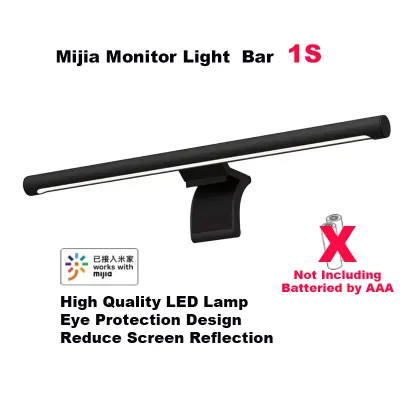
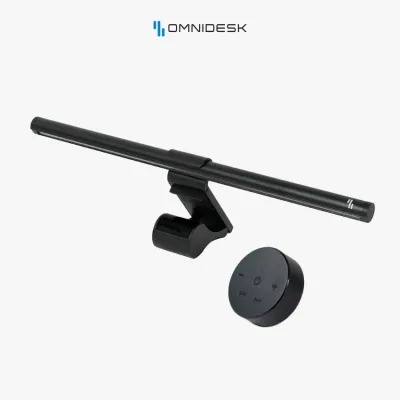
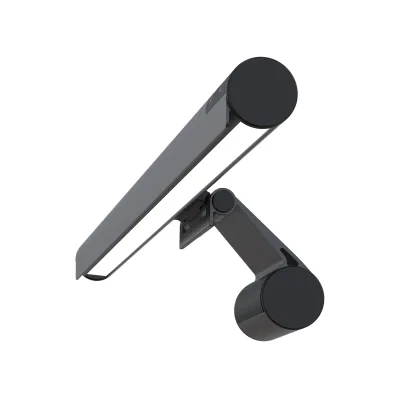
Prices are valid at publication and may change. Please refer to the product page for the latest price.
Illumination and Screen Glare Control
The primary purpose of a monitor light bar is to illuminate your desk workspace without casting glare onto your screen or directly into your eyes. High-quality light bars achieve this through an asymmetric optical design. This design uses a precise internal reflector to direct light downward and forward in a strict triangular path, completely avoiding the reflective surface of the monitor. Standard, lower-cost alternatives often use diffused light bars that scatter light in all directions, which can cause distracting screen reflections and eye fatigue during long working hours.
When comparing brands, you should closely examine the manufacturer’s specifications for illuminance uniformity and the Color Rendering Index (CRI). A high CRI rating (typically Ra 95 or above) ensures that colors on your desk appear natural and vibrant, which is crucial for creative professionals, designers, and editors. Additionally, verify the adjustable color temperature range, usually measured in Kelvin (K). A wide range, such as 2700K to 6500K, allows you to transition from a cool, energizing white light during daytime productivity to a warm, relaxing amber light for late-night tasks.
You should also check the maximum brightness levels, measured in lux at a specific distance (such as 500 lux at 45 cm). Ensure the light bar provides consistent brightness across your entire primary work zone rather than focusing a harsh hotspot directly beneath the lamp.
Mounting Mechanism and Monitor Compatibility
A light bar is only useful if it can sit securely on top of your monitor. Premium models like the BenQ ScreenBar Halo 2 typically utilize a gravity pivot mount or a counterweight system. This design relies on a heavy rear weight to balance the light bar gently on the top bezel, minimizing physical pressure on the delicate LCD panel. In contrast, many budget-friendly brands use spring-loaded clamps or mechanical clips that squeeze the monitor frame, which can potentially damage modern thin-bezel screens or cause light bleed along the edges.
Before purchasing any light bar, you must measure your monitor’s physical dimensions. Create a quick checklist covering the bezel thickness at the top of the screen, the curvature radius (such as 1000R, 1500R, or 1800R) if you use a curved display, and the clearance space on the back panel. Curved monitors require a light bar with a specialized adapter or a naturally curved body to prevent the straight light tube from clipping the corners of the screen or casting shadows.
Additionally, consider potential physical interference with other desktop accessories. If you use an external webcam for video calls, a monitor arm that tilts your screen, or a monitor with a thick protective casing, check how the light bar’s mounting bracket interacts with these items. Some light bars block the top edge entirely, while others offer dedicated webcam mounts or low-profile brackets to accommodate external cameras.
Controls and Smart Features
How you interact with your light bar daily significantly impacts your overall user experience. The BenQ ScreenBar Halo 2 is notable for its wireless controller—a dedicated desktop dial that lets you adjust brightness, color temperature, and lighting modes without reaching up to touch the light bar itself. Other brands may offer physical buttons on the light bar chassis, wired inline controllers, or touch-sensitive panels on the front face of the light. While touch panels keep the desk clean, reaching up to adjust them can sometimes shift the light bar out of alignment.
Another critical feature to compare is the integration of ambient light sensors. High-end light bars often feature an auto-dimming function that continuously detects the surrounding room light and automatically adjusts the light bar’s output to maintain an optimal brightness level (typically recommended around 500 lux for office work). This automation helps reduce eye strain as daylight shifts throughout the day.
For highly integrated smart home or tech-heavy setups, some alternative brands offer software control via USB or smart app integration. This allows you to adjust your desk lighting directly from your computer keyboard or sync it with other smart lighting systems in your room. If you prefer a hands-off, automated setup, prioritize models with robust sensor integration and reliable control interfaces.
How to Verify Specs Before You Buy
To avoid the hassle of returns and ensure a seamless installation, you must verify several technical specifications before making a purchase. First, cross-reference your monitor’s VESA mount clearance and rear profile with the light bar’s clamp specifications. If your monitor has a highly pronounced curve on the back cover or a bulky integrated stand bracket near the top, a standard gravity mount may not sit flat. Check the manufacturer’s compatibility guides, which often list maximum bezel depths and compatible back-panel angles.

Second, pay close attention to power delivery requirements. Most modern monitor light bars are powered via a USB connection, but their power draw can vary. A premium light bar with high-brightness LEDs and a rear ambient light may require a 5V/2A (10W) power source to operate at maximum capacity. While many desktop monitors feature built-in USB ports, some of these ports only output 5V/0.5A or 5V/0.9A. Connecting a high-power light bar to an underpowered port can lead to flickering, automatic shutdown, or limited brightness levels. Always verify the required wattage and be prepared to use a dedicated USB wall adapter if your monitor’s ports are insufficient.
Finally, because monitor designs vary wildly, always review the retailer’s return policy before buying. Ensure that you can return or exchange the light bar if the mounting mechanism fails to grip your specific monitor securely or if the light path causes unexpected glare on your screen’s anti-reflective coating. This precaution is especially important when buying online where physical testing prior to purchase is not possible.
Matching the Light Bar to Your Workspace Setup
Your physical desk environment plays a major role in determining which light bar will perform best. If you work on a deep desk (for example, 70 cm or deeper), you will need a light bar with a wider light distribution angle and higher maximum output to ensure the light reaches your keyboard and writing area. For shallow desks (50 cm or less), a more compact light bar with a narrower beam angle is often ideal, as it prevents light from spilling over the front edge of the desk and reflecting off your lap.
You must also consider the existing ambient lighting in your room. If your workspace is located in a room with bright, overhead fluorescent lighting, a basic light bar can serve as a simple task light to fill in shadows. However, if you work in a dimly lit room or prefer to work at night with the main room lights turned off, a light bar with a rear-facing ambient light—such as the one featured on the BenQ ScreenBar Halo 2—becomes highly valuable. This rear light acts as bias lighting, illuminating the wall behind your monitor to reduce the harsh contrast between the bright screen and the dark room, which significantly lowers eye strain.
Lastly, evaluate your cable management preferences. A wireless controller reduces desk clutter but requires battery power, whereas a wired controller or on-device buttons eliminate the need for batteries but add another cable to route behind your desk. If you are aiming for a clean, minimalist aesthetic, factor in how the light bar’s power cable and controller wires will integrate with your existing cable management sleeves and monitor arms.
Final Decision Framework
To help you make the final choice between the BenQ ScreenBar Halo 2 and alternative monitor light bars, use the following structured guidelines based on your specific setup and priorities.
Choose the BenQ ScreenBar Halo 2 if:
- You use a curved or ultrawide monitor and need a guaranteed, secure fit without screen glare.
- You want a premium, clutter-free desk setup with a dedicated wireless desktop controller.
- You frequently work in dark rooms and want integrated rear bias lighting to reduce eye strain.
- You prioritize high color accuracy (CRI) and uniform light distribution for professional creative work.
Choose an alternative brand if:
- You are working with a strict budget and only require basic desk illumination.
- You use a standard, flat monitor where advanced mounting geometry is not strictly necessary.
- You prefer simple, on-device touch controls and do not want to manage batteries for a wireless remote.
- You want to integrate your desk lighting with existing smart home ecosystems or PC software.
Verify first if:
- Your monitor has an extremely thin bezel (less than 5mm) where a clamp might press directly on the active display area.
- Your monitor's rear housing is highly irregular, stepped, or features a prominent top-mounted webcam.
- Your available USB power source (monitor hub or PC port) meets the exact voltage and amperage requirements specified by the light bar manufacturer.
Frequently Asked Questions (FAQ)
Do monitor light bars work with curved or ultrawide monitors?
Yes, but compatibility depends heavily on the mounting design. Standard straight light bars can sometimes clip the corners of curved screens or cast shadows across the display. To avoid this, look for light bars specifically designed with curved monitor adapters or those with a curved chassis. Always check the manufacturer’s specifications to verify the supported curvature range (such as up to 1000R or 1500R) before purchasing.
Can a monitor light bar power itself through the monitor's USB port?
Many monitor light bars can run off a monitor’s built-in USB port, but you must verify the port’s power output. Premium light bars with high-power LEDs or dual-source lighting (front and rear) often require a 5V/2A (10W) power supply. If your monitor’s USB port only outputs 0.5A or 0.9A, the light bar may flicker, fail to reach maximum brightness, or shut down. If this occurs, connect the light bar to a dedicated USB wall charger or a powered USB hub.

Community discussion
Share your experience or ask a question. Comments are reviewed before publication.