
Choosing between a monitor light bar and a premium desk lamp is one of the most impactful decisions you can make for your workspace ergonomics. While both options aim to reduce eye strain and improve visibility, they approach the task with entirely different physical designs and optical patterns. The BenQ ScreenBar and the BenQ WiT represent the pinnacles of these two distinct form factors. Deciding which setup works best for your workspace requires a close look at your physical desk layout, your daily tasks, and how you interact with your screens and physical documents.
Evaluate Mounting Styles and Desk Footprint
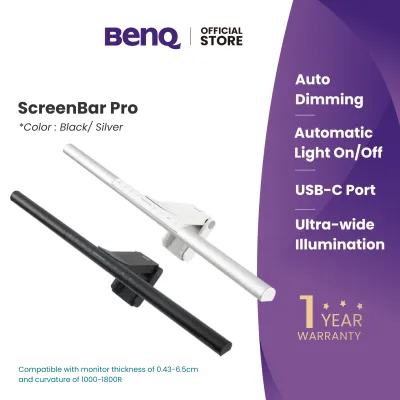
The physical footprint of your lighting setup directly dictates how organized and spacious your desk feels. The BenQ ScreenBar is designed with a zero-footprint philosophy. It utilizes a patented gravity pivot clip that rests securely on top of your monitor’s upper bezel. This counterweight design requires no adhesive, screws, or mechanical clamps, relying instead on gravity to balance the light bar. However, this mounting style requires specific physical clearance behind your monitor. If your screen is mounted on a wall bracket or positioned flush against a cubicle partition, you must ensure there is sufficient space—typically a few centimeters—for the heavy counterweight to hang freely without obstruction.
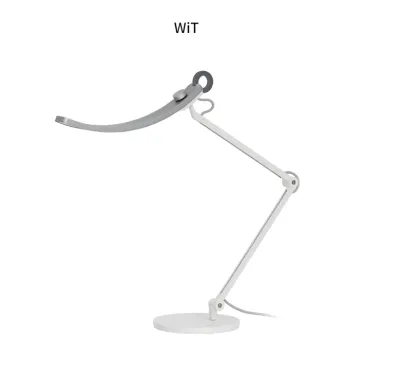
In contrast, the BenQ WiT is a traditional swing-arm desk lamp that requires a physical mounting point on your desk surface. The standard configuration includes a heavy, highly stable metallic base designed to prevent tipping even when the articulated arm is fully extended. While this base provides exceptional stability, it occupies a noticeable amount of surface area, which can be a limiting factor on compact study desks or in cozy home offices where space is at a premium. To reclaim this desk space, you can opt for the dedicated desk clamp accessory. Before purchasing the clamp, verify that your desk has a sturdy, flat edge with sufficient clearance underneath, and ensure the desk material can withstand the concentrated clamping pressure.
Products mentioned in this guide
![[New] BenQ ScreenBar Halo 2 | Monitor Light | Wireless Control | Auto Dimming & Auto On/Off | Back Light | Desk Lamp | 3 Light Modes](https://img.lazcdn.com/g/p/3efb87ef278da69695a8c36fca44e243.png_400x400q80.png_.webp)
Prices are valid at publication and may change. Please refer to the product page for the latest price.
Cable management and power delivery also differ significantly between these two form factors. The ScreenBar is powered via a USB connection, drawing power directly from your monitor’s built-in USB port or a standard USB wall charger. This keeps cable runs short and neat, but you must verify that your power source delivers the correct voltage and current—typically 5V and at least 1A—to ensure stable, flicker-free operation. The WiT lamp requires a dedicated external power adapter that plugs into a standard electrical outlet. While this introduces a thicker power cord that you will need to route along the articulated arm and behind your desk, it ensures a robust, high-wattage power supply capable of driving the lamp’s expansive LED array.
Match Light Distribution to Your Daily Tasks
The optical design of your light source should align closely with the type of work you perform. The ScreenBar features an asymmetric optical design that directs light downward and forward in a precise wedge shape. This specialized beam pattern ensures that the light illuminates your keyboard and desk surface while completely avoiding the monitor screen itself. By preventing light from reflecting off the glass, the ScreenBar eliminates veiling glare, which is a primary cause of eye fatigue, headaches, and squinting during long hours of digital work. This makes it an exceptional choice for programmers, writers, and office professionals whose workflows are entirely screen-based.

For tasks that involve physical media, the curved head of the WiT desk lamp offers a distinct advantage. The lamp’s unique “smile curve” is engineered to distribute light in a wide, uniform arc across your entire desk. Rather than concentrating light in a single spot, this wide-angle distribution minimizes harsh shadows and ensures that physical documents, textbooks, architectural drawings, or crafting materials are evenly illuminated from edge to edge. If your daily routine involves sketching, reading printed books, or assembling physical components alongside your computer work, the broad coverage of the WiT provides a more comfortable and versatile visual environment.
Adjustability is another key differentiator when matching a lamp to your tasks. The WiT offers highly flexible physical positioning thanks to its articulated arm and ball-joint connection at the lamp head. You can easily adjust the height, angle, and lateral position of the light to adapt to changing tasks throughout the day. The ScreenBar, while highly effective, offers limited physical adjustability once mounted, allowing only a small degree of rotation within its clip to fine-tune the beam angle. Both models feature advanced electronic controls for adjusting brightness and color temperature, allowing you to transition from cool, high-contrast white light for focus to warm, relaxing light for evening tasks.
Assess Your Physical Workspace Layout
Your physical desk geometry and monitor configuration are critical factors that can make or break the compatibility of your lighting setup. Desk depth is a primary consideration; on a shallow desk, a traditional desk lamp can feel cramped and may cast light directly into your eyes if not positioned carefully. The ScreenBar excels in shallow workspaces because it sits high above the desk and directs light downward, keeping the source out of your direct line of sight. On a deeper desk, however, the long reach of the WiT’s articulated arm allows you to project light forward, ensuring that your active working zone remains brightly lit even if your monitor is positioned further back.
Multi-monitor setups and desktop accessories also introduce physical constraints. If you use a dual-monitor array, a single ScreenBar mounted on one screen will leave the adjacent workspace unevenly lit, creating a high-contrast environment that can strain your eyes. Additionally, if you rely on a high-quality webcam for video conferences, mounting it on top of your monitor can be difficult when a light bar occupies the same space. The WiT lamp, when mounted on a desk clamp behind or beside your screens, can be elevated and angled to sweep light across a dual-monitor setup without interfering with webcams or other top-mounted accessories.
Finally, consider the structural limits of your monitor mounting system. While a screen bar is relatively lightweight, its gravity-based mounting clip concentrates weight on the top bezel of your display. If your monitor is mounted on a gas-spring monitor arm, you must verify that the arm’s tilt tension is adjusted correctly to support the additional weight. A weak or improperly adjusted monitor arm may sag or tilt forward under the weight of the light bar, disrupting your viewing angle and potentially causing stability issues.
Final Decision Framework: Choose Your Setup
To finalize your decision, evaluate your workspace against this conditional framework to determine which lighting style aligns best with your daily habits and physical constraints.
Choose the ScreenBar if:
- You prioritize a completely clear, minimalist desktop with a zero-footprint lighting solution.
- Your daily workflow is almost exclusively digital, requiring minimal interaction with physical paperwork.
- You use a single, standard flat-panel monitor that can easily accommodate a top-mounted gravity clip.
- You prefer a simple, low-voltage USB-powered setup that can turn on and off automatically with your computer.
Choose the WiT desk lamp if:
- Your work involves a mix of digital tasks and physical activities like reading, sketching, or crafting.
- You require highly flexible, multi-axis physical adjustability to redirect light across different areas of your desk.
- You have a deep desk or a multi-monitor configuration that requires a wide, uniform sweep of light.
- You use a monitor arm or have top-mounted accessories (like webcams) that make mounting a light bar impractical.
Before making your purchase, complete these essential verification checks:
- Monitor Bezel and Thickness: Measure the top bezel of your monitor. Ensure it is thick enough to support a gravity clip securely, and check that the monitor's rear profile does not have an extreme curve or protrusion that would prevent the counterweight from hanging properly.
- Desk Edge and Material: If you plan to use the WiT with a desk clamp, measure your desk's edge thickness and verify that the material is structurally sound (avoid hollow-core or thin glass desks without proper reinforcement).
- Power Specifications: Verify that your available USB ports or wall outlets match the voltage and wattage requirements specified by the manufacturer to ensure safe, reliable, and flicker-free operation.
Frequently Asked Questions (FAQ)
Can I use a screen bar on a curved monitor?
Yes, but compatibility depends on the curvature of your monitor and the design of the mounting clip. Because curved monitors bend toward the user, a standard straight light bar can sometimes cast light onto the outer edges of the screen, leading to glare and reflections. Additionally, an aggressive curve may prevent a standard flat gravity clip from seating securely on the bezel. Before purchasing, check the manufacturer’s specifications for curved-screen compatibility. Some light bars offer specialized mounting adapters, foam spacers, or adjustable counterweights designed specifically to accommodate curved displays safely.
Does the WiT desk lamp support dual monitor setups?
The WiT desk lamp can support dual monitor setups quite effectively, provided you plan its placement carefully. Because of its wide, curved light head and long articulated arm, the WiT can project a broad arc of light across a wide area. To achieve even illumination without casting shadows, it is best to use the optional desk clamp accessory to mount the lamp arm centrally behind or to the side of your dual screens. This allows you to elevate the light head high above the monitors, casting a uniform downward beam that covers both workspaces without creating distracting dark spots.

Community discussion
Share your experience or ask a question. Comments are reviewed before publication.