
The physical bulb holder in your light fixture does not determine whether your lights can be dimmed or controlled by a smart remote. Instead, compatibility depends entirely on the bulb you choose and the control system you install. Any standard bulb holder can support dimming or smart functionality, provided you pair it with a compatible bulb and the correct control mechanism.
Understanding how these components interact is the key to avoiding common issues like flickering, buzzing, or premature bulb failure. Whether you are upgrading to smart lighting or installing a traditional wall dimmer, matching your hardware correctly ensures a safe and reliable setup.
Understanding Bulb Holder and Socket Roles
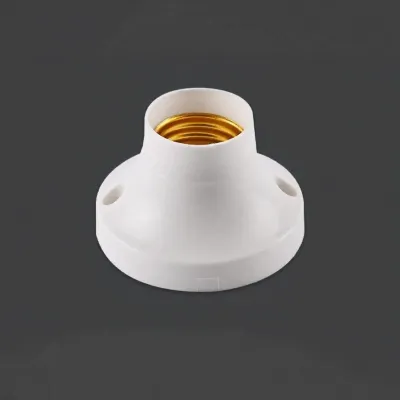
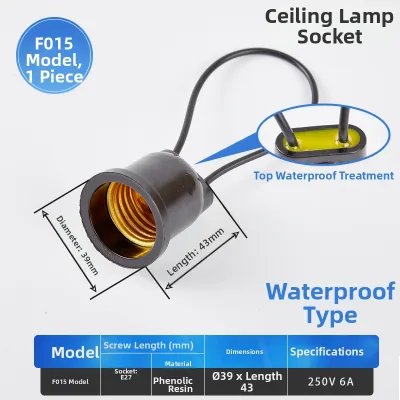
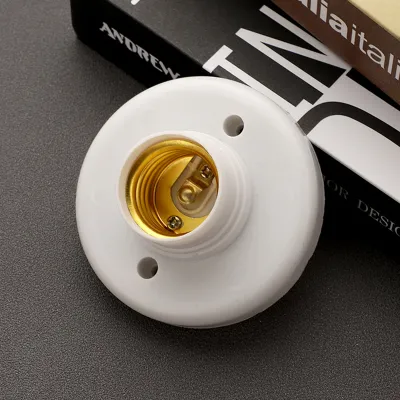
Bulb holders, also known as light sockets, serve as the physical and electrical connection between your home’s wiring and the light bulb. Common types include the E27 Edison screw, the B22 bayonet cap, and the GU10 twist-lock spotlight fitting. These holders are passive components; they simply transfer electrical current and do not contain any dimming or smart control circuitry.
Products mentioned in this guide
![[HomeBox] 🇸🇬 GU10 / MR16 Holder LED bulb Holder 15cm](https://img.lazcdn.com/g/p/d274ee6f7c0310e95a0a42445356e4a1.jpg_400x400q80.jpg_.webp)
![[SG Local Stock] Lightbulb Holder // Ceiling Light Holder // LED Light Fixture Holder // LED Starter](https://img.lazcdn.com/g/p/5b04b84af7265b750ae4734c47e33045.jpg_400x400q80.jpg_.webp)

Prices are valid at publication and may change. Please refer to the product page for the latest price.
Because bulb holders are passive, you do not need to buy a specific “smart bulb holder” or “dimmable socket” for standard mains-voltage setups. A standard E27 holder will happily power a traditional incandescent bulb, a dimmable LED, or a smart color-changing bulb. The holder’s primary job is to safely secure the bulb and provide a reliable electrical contact.
However, the distinction between mains-voltage and low-voltage holders is critical. Standard holders like E27, B22, and GU10 run directly on your home’s mains voltage. In contrast, low-voltage fittings, such as MR16 or GU5.3 sockets, require an external transformer or driver to step down the voltage. If you want to dim low-voltage bulbs, the transformer itself must be compatible with your dimmer switch.
Checking Dimmer Switch and Bulb Compatibility
To achieve smooth dimming without flickering or buzzing, you must ensure that your bulb and your wall dimmer switch are fully compatible. The first step is to check the bulb packaging or specifications for an explicit “dimmable” label. Standard, non-dimmable LED bulbs cannot handle the altered electrical signals from a dimmer switch and will quickly fail or flicker if dimmed.

You must also match the technology of your dimmer switch to the type of bulb you are using. Traditional dimmer switches, known as leading-edge dimmers, were designed for high-wattage incandescent and halogen bulbs. Modern LED bulbs operate on much lower wattages and require trailing-edge dimmers, which provide smoother control and prevent electrical stress on the bulb’s internal driver.
Another common issue is matching the total wattage load of your light fixtures to the dimmer switch’s ratings. Dimmer switches have both maximum and minimum wattage limits. If you connect a series of highly efficient LED bulbs to an older dimmer, the total wattage might fall below the switch’s minimum threshold, leading to unstable performance. Always calculate the combined wattage of your bulbs and verify that it falls within the dimmer’s specified operating range.
Setting Up Smart Remotes and Control Systems
When planning a smart lighting setup, you must decide whether to make the bulb itself smart or to control standard bulbs using a smart switch. Smart bulbs have built-in wireless receivers and dimming microchips. Because the smart technology is contained entirely within the bulb, you can screw them into any standard, non-smart bulb holder and control them immediately via a remote, app, or voice assistant.
Alternatively, you can install a smart wall switch or an inline smart relay behind your existing switch. This approach allows you to use standard, non-smart dimmable bulbs in your existing holders while still enjoying remote control capabilities. The smart switch manages the power flow to the bulb holders, making it an excellent choice for fixtures with multiple bulbs, such as chandeliers or track lights.
Smart lighting systems communicate using various wireless protocols, including Wi-Fi, Zigbee, Bluetooth, or Radio Frequency (RF). Wi-Fi bulbs connect directly to your home router, which is convenient for small setups but can strain your network if you install dozens of bulbs. Zigbee and RF systems require a dedicated smart hub to bridge the connection, offering a more stable and scalable solution for whole-home setups.
It is vital to remember that smart bulbs should never be paired with traditional wall dimmer switches. Smart bulbs require a constant, uninterrupted supply of full electrical power to keep their internal wireless chips active. Lowering the voltage with a traditional wall dimmer will starve the smart bulb of power, causing it to disconnect from your network, flicker violently, or suffer permanent internal damage.
Managing Power, Voltage, and Safety Limits
Electrical safety must always be your top priority when installing or modifying lighting controls. In Singapore, the standard mains voltage is 230V at a frequency of 50Hz. You must verify that all bulb holders, dimmer switches, and smart bulbs you purchase are rated for this specific voltage to prevent overheating, short circuits, or fire hazards.
Before installing any new components, calculate the total electrical load on the circuit. Ensure that the combined wattage of all connected bulbs does not exceed the maximum rating of the bulb holder or the circuit breaker. Overloading a circuit can lead to tripped breakers, damaged wiring, and potential safety risks.
For any tasks involving fixed electrical wiring—such as replacing a standard wall switch with a smart dimmer, modifying your home’s wiring topology, or working with high-voltage ceiling fixtures—always isolate the power at the main distribution board first. If you are unsure about the wiring configuration or if your home lacks a neutral wire (which many smart switches require), stop immediately and consult a licensed electrical worker to complete the installation safely.
Your Pre-Purchase Compatibility Checklist
Before purchasing new bulb holders, bulbs, or dimming controllers, take a moment to run through this practical checklist to ensure a seamless installation:
- Identify the physical socket type (such as E27, B22, or GU10) required by your light fixtures.
- Confirm that the bulbs you buy are explicitly labeled as "dimmable" if you plan to use a wall dimmer.
- Verify that your wall dimmer switch is a trailing-edge model compatible with low-wattage LED bulbs.
- Ensure that smart bulbs will receive constant, un-dimmed power from a standard on/off switch.
- Check if your chosen smart switches require a neutral wire behind the wall plate.
- Confirm that all electrical components are rated for Singapore's 230V mains voltage.
Frequently Asked Questions (FAQ)
Can I use a smart bulb with a traditional dimmer switch?
No, you should not use a smart bulb with a traditional wall dimmer switch. Smart bulbs contain sensitive internal electronics and wireless receivers that require a constant, stable 230V power supply to function. If you reduce the voltage using a traditional dimmer, the smart bulb will lose its wireless connection, flicker, and its internal driver may suffer permanent electrical damage. To use smart bulbs safely, replace your traditional dimmer switch with a standard on/off switch.
Do GU10 holders require special transformers for smart spotlights?
Standard GU10 bulb holders run directly on 230V mains voltage and do not require an external transformer. This makes them highly compatible with smart GU10 spotlight bulbs, which can be twisted directly into the holder without any additional hardware. However, if you are replacing low-voltage MR16 or GU5.3 spotlights, those systems do use transformers. To use smart bulbs in those fixtures, you must either ensure the existing transformer is compatible with smart low-voltage bulbs or have a professional convert the fittings to mains-voltage GU10 holders.

Community discussion
Share your experience or ask a question. Comments are reviewed before publication.