
Finding the right table lamp with USB charging for a study desk in Singapore requires balancing optical performance with electrical output. Instead of looking for a single brand that claims to do it all, you must evaluate how different manufacturers balance lighting quality—such as flicker-free illumination and high Color Rendering Index (CRI)—with USB charging capabilities, ranging from standard USB-A ports to high-output USB-C Power Delivery (PD). This guide provides a systematic verification framework to help you assess any brand’s specifications, match power outputs to your devices, and ensure electrical safety on your desk.
Whether you are looking at budget-friendly options around S$30 or premium models exceeding S$150, understanding these specifications ensures you select a lamp that protects your eyes while keeping your essential devices powered throughout your study sessions.
Essential USB and Lighting Specifications to Verify
To evaluate any table lamp brand objectively, you must look past marketing claims and analyze the technical specifications listed on the product label or manual. The electrical output of the integrated USB port is determined by three key metrics: voltage (measured in Volts, V), current (measured in Amps, A), and total power (measured in Watts, W). You can calculate the maximum power output using the formula: Watts = Volts × Amps.
Products mentioned in this guide
![[Metaverse] USB Charging Touch Bedroom Bedside Decorative Night Light Nordic Creative Ins LED Wireless Table Lamp](https://img.lazcdn.com/g/p/a5340303ba861631f47c592c4b71ce79.jpg_400x400q80.jpg_.webp)
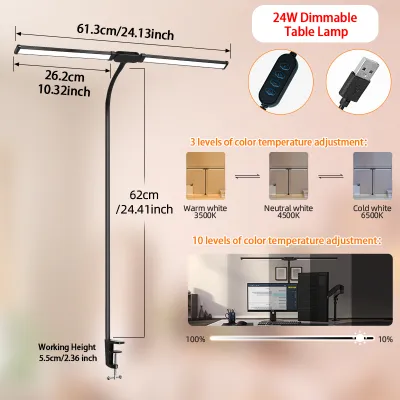
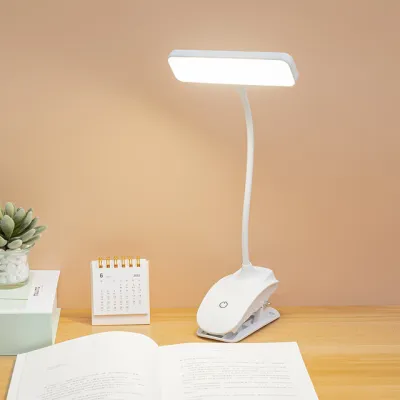
Prices are valid at publication and may change. Please refer to the product page for the latest price.
Standard table lamps often feature USB-A ports, which typically output 5V at 1A (5W) or 5V at 2.1A (10.5W). Modern devices, however, increasingly rely on USB-C Power Delivery (PD) ports. These ports can dynamically negotiate higher voltages and currents, allowing them to deliver 18W, 30W, or even 65W of power. When comparing brands, check whether the USB port is a legacy USB-A type or a modern USB-C PD port, as this directly dictates what devices you can charge.
Simultaneously, you must verify the lamp’s primary function: lighting. Look for a high Color Rendering Index (CRI), ideally Ra 90 or above, which ensures colors appear natural and vivid under the light. The brightness, measured in Lumens, should be sufficient for reading without causing glare, typically ranging between 400 and 800 lumens for a study desk. Finally, check if the lamp offers adjustable color temperature, measured in Kelvin (K), allowing you to switch from a warm white (around 3000K) for relaxed reading to a cool daylight (around 5000K) for high-focus tasks.
To find these specifications, locate the manufacturer’s specification label, which is usually printed on the underside of the lamp base or detailed in the technical specifications section of the user manual. If a brand does not clearly state these metrics, it is best to proceed with caution, as unrated electrical components can pose safety risks.
Matching USB Power Output to Your Study Devices
Before choosing a lamp, identify the power requirements of the gadgets you plan to charge on your study desk. Smartphones generally require between 10W and 20W to charge at a reasonable speed. If you plug a modern smartphone into a basic 5W USB-A port, you will experience slow charging, and the battery may even drain if you are actively using the phone for video calls or resource-intensive tasks.

Larger devices, such as tablets and laptops, have much higher power demands. Tablets typically require 18W to 30W, while laptops generally need 45W to 65W or more. A standard table lamp with a low-output USB-A port cannot support these devices. Attempting to charge a laptop from an underpowered port will result in no charge at all, or a warning message on your device indicating an incompatible power source.
For this reason, you should evaluate a table lamp’s USB port primarily as a convenience feature rather than a primary fast-charging hub. It is highly suitable for keeping low-power accessories topped up, such as wireless earbuds, smartwatches, or e-readers. If you require rapid charging for multiple high-draw devices simultaneously, relying on a dedicated multi-port wall charger or a desktop power strip is a more practical approach.
Assessing Lighting Quality and Desk Ergonomics
A study lamp must provide comfortable, high-quality illumination to prevent eye strain during long working or reading sessions. When evaluating different brands, look for flicker-free technology. Low-quality LED lamps often exhibit invisible high-frequency flickering that can cause headaches and eye fatigue over time. You can perform a quick check by viewing the light through your smartphone’s camera; visible banding on the screen often indicates a high level of flicker.
Anti-glare diffusers are equally important. A good study lamp should feature a frosted or micro-prismatic diffuser that distributes light evenly across your workspace, minimizing harsh reflections on book pages, tablet screens, and computer monitors. This is particularly crucial in Singapore’s compact study spaces, where desks are often positioned close to walls or windows, increasing the potential for reflective glare.
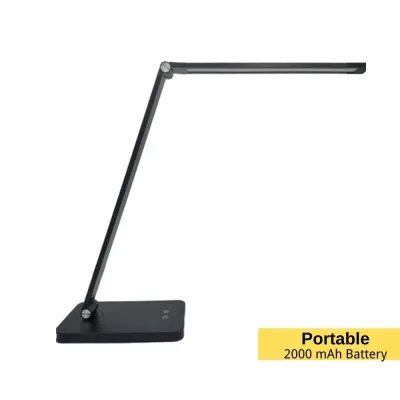
Physical adjustability is another critical factor for desk ergonomics. Look for lamps with multiple points of articulation, such as a rotating base, a tilting arm, and a swiveling head. This flexibility allows you to position the light source precisely where you need it, preventing shadows cast by your hands or head. Ensure the arm reach is sufficient for your desk height and monitor setup.
Finally, consider the physical footprint and weight of the lamp base. A study desk can quickly become crowded with laptops, textbooks, and stationery. A lamp with a compact base saves valuable desk real estate, but it must be heavy enough to remain stable. If the lamp is too light, adjusting the arm can cause the entire unit to tip over, potentially damaging the lamp or your devices.
Brand Selection Framework: Matching Features to Your Setup
When navigating the market, you will find that table lamp brands generally fall into two distinct categories, each catering to different user priorities. Understanding this division helps you narrow down your choices based on your specific study setup.
If your primary priority is optical quality, eye comfort, and precise ergonomic control, you should focus on established lighting brands. These manufacturers invest heavily in optical research, offering lamps with exceptional color rendering, advanced glare reduction, and highly adjustable designs. While their integrated USB ports may sometimes be limited to standard outputs, their lighting performance is tailored for long-term eye health.
Conversely, if your priority is a high-tech, integrated workspace, look toward tech-accessory or smart-home brands. These brands often feature advanced charging capabilities, including high-output USB-C PD ports, integrated wireless charging pads, and smart-home connectivity. These lamps are ideal if you want to minimize cable clutter and control your lighting via mobile apps or voice assistants, though you should carefully verify that their optical specifications meet your study needs.
Regardless of the brand type you choose, always verify the manufacturer’s after-sales support and warranty terms. Electronic components, particularly integrated USB charging circuits, can occasionally fail. Ensure the brand provides a clear warranty that covers both the LED light source and the electronic charging modules. Additionally, check if replacement power adapters or parts are readily available from the manufacturer or authorized distributors in Singapore.
Safety, Compatibility, and Installation Checks
Integrating electrical charging ports into a light fixture introduces additional safety considerations. In Singapore, it is essential to verify that the lamp’s power adapter carries the local Safety Mark. This certification ensures the adapter has been tested and approved for safe use with Singapore’s 230V, 50Hz electrical grid, protecting your home from potential electrical fires or short circuits.
Furthermore, ensure the lamp features built-in protection circuits, including overcurrent, overvoltage, and short-circuit protection. These safety mechanisms prevent electrical surges from damaging your expensive smartphones or tablets while they are plugged into the lamp. This information is typically listed in the product specifications or on the manufacturer’s website.
To maintain a safe study environment, avoid daisy-chaining high-draw devices. Do not plug a power strip into the lamp’s USB port, and avoid plugging the lamp itself into an overloaded extension cord. If you notice the lamp base or the power adapter becoming excessively hot to the touch during charging, disconnect your devices immediately. In such cases, or if you are charging high-power devices like laptops, stop using the lamp’s ports and plug your devices directly into a dedicated wall outlet.
Frequently Asked Questions (FAQ)
Can a table lamp's USB port charge a laptop?
In most cases, a standard table lamp’s USB port cannot charge a laptop. Most lamps feature low-power USB-A ports (5W to 10W), whereas laptops typically require a minimum of 45W to 65W delivered via a USB-C Power Delivery (PD) port. To determine if a specific lamp can charge your laptop, check the lamp’s manual for its maximum wattage output and verify if it supports USB-C PD. If the output wattage is lower than your laptop’s requirement, the laptop will not charge.
Does leaving my phone plugged into the lamp overnight damage the battery?
Modern smartphones are equipped with advanced battery management systems that automatically stop or slow down charging once the battery reaches 100%. However, to ensure safety and protect your device’s battery health, the table lamp itself must have certified overcharge and overcurrent protection circuits. Using a lamp from a reputable brand that meets local safety standards minimizes the risk of overheating or battery degradation during overnight charging.
Is it safe to use a USB table lamp near water or humid areas?
No, standard USB table lamps are designed for dry indoor environments and are not IP-rated for resistance against water or high humidity. To prevent electrical shocks, short circuits, or damage to the internal charging components, keep the lamp away from drink spills, humidifiers, and open windows, especially during heavy rainstorms in Singapore. Always place the lamp on a dry, stable surface away from any liquid sources.

Community discussion
Share your experience or ask a question. Comments are reviewed before publication.